
By Wearablewhiz / Published June 17, 2026 · Updated September 11, 2026
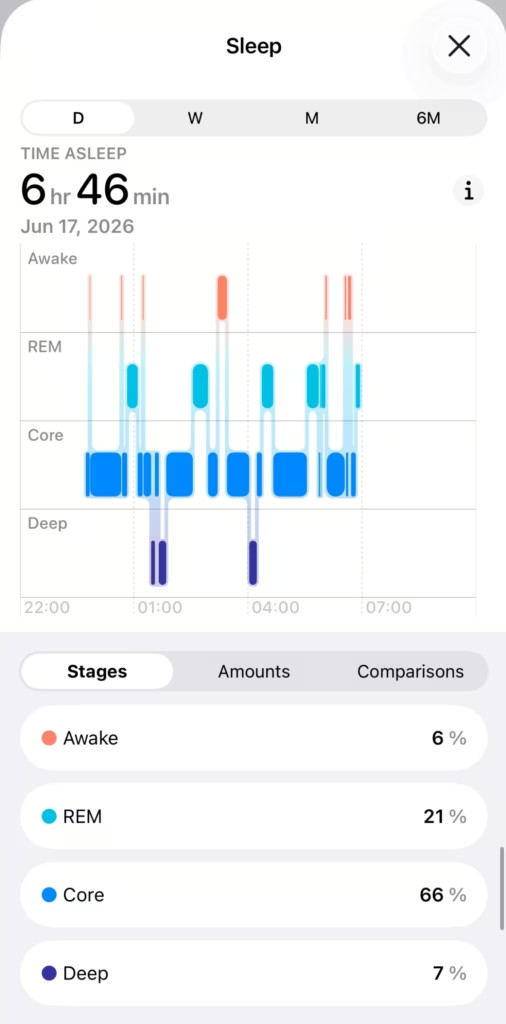
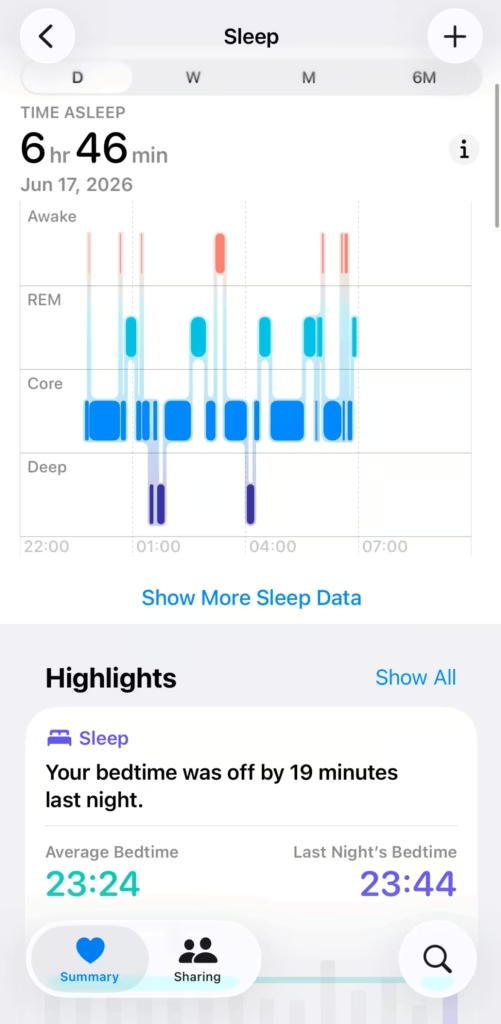
The sleep score said 90. Excellent. My deep sleep was 7%. Those two things can both be true at the same time and that’s exactly the problem with only reading the headline number.
Most people check their total hours and move on. The real value is hidden in the stages, heart rate trends, and weekly patterns.
Key Takeaways: Apple Watch Sleep Tracking
If you want a simple way to understand how Apple Watch sleep tracking works, how to interpret your sleep score, and what your deep sleep or REM percentages actually mean, here is the quick bottom line:
- Sleep Score (0–100) is based on duration, consistency, and interruptions, but ignores sleep stages.
- Focus on sleep stages (Deep, REM, Core) and trends over the week for real quality insights.
- Use Sleep Focus + Schedule for reliable stage data and fewer interruptions.
- Key metrics to watch:
- Deep sleep: Aim for 10–15%+ of total sleep
- REM sleep: Aim for 15–20%+
- Elevated overnight heart rate or respiratory rate = possible stress or illness
- Wrist temperature deviations = early warning sign
- Look at the weekly view in the Health app: single nights are noisy.
- Combine with Vitals app and Training Load for a complete recovery picture.

Why Apple Watch sleep tracking is worth paying attention to
Overnight is when your body actually recovers from everything you did during the day. Heart rate drops. HRV shifts through each cycle. Wrist temperature moves against your personal baseline. Your Watch reads all of that while you sleep.
The data is there every morning. Most people never look at it, or they glance at total hours and move on. Total sleep time is the least informative number in the whole stack.
How to get sleep tracking set up (and why it might not be working)
Setup is a one-time thing. Open the Sleep app on your Apple Watch and follow the on-screen instructions, or do it on your iPhone: open the Health app, tap Search, tap Sleep, then tap Get Started.
During setup you’ll be asked to set a sleep goal, a bedtime, and a wake-up time. You can edit or turn off that schedule any time: go to Health > Sleep > Full Schedule & Options and toggle Sleep Schedule off. Turning the schedule off doesn’t stop tracking. Sleep Tracking is a separate toggle, and as long as it’s on, the watch records your sleep when you wear it to bed.
Sleep Focus works the same way. By default it activates automatically at your wind-down time. Sleep Focus is one of Apple’s built-in Focus modes. When it’s active, your watch display turns off and notifications are silenced, so nothing wakes you up mid-sleep. It syncs across your iPhone automatically.
If you want to turn it on manually without a schedule: press the side button to open Control Center, tap the Focus button, then select “Sleep”. You can choose how long to keep it active. That’s it.
If you don’t use Focus modes, you can turn that off: go to Settings > Sleep > Turn On at Wind Down and switch it off. Sleep tracking keeps running either way. You don’t need to manually trigger anything before bed. Read more on Sleep Focus here: Use Focus on Apple Watch.
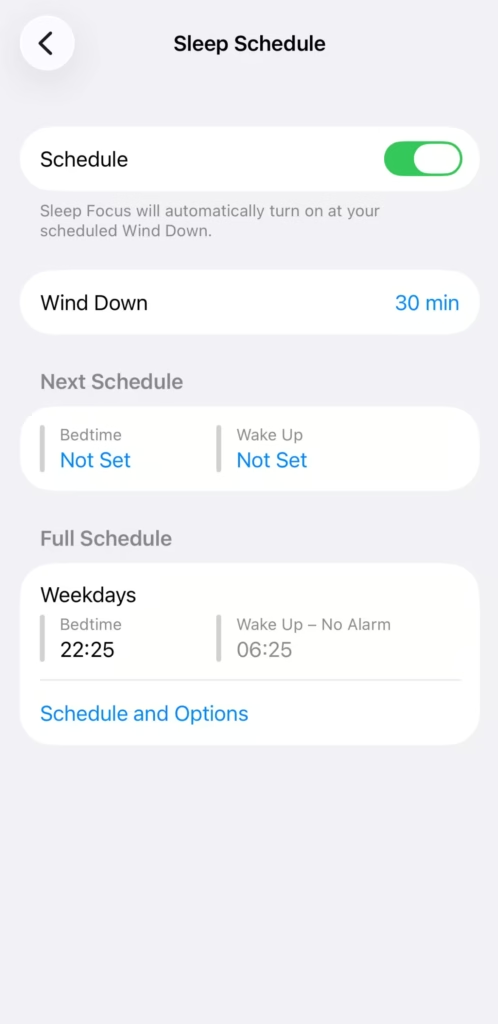
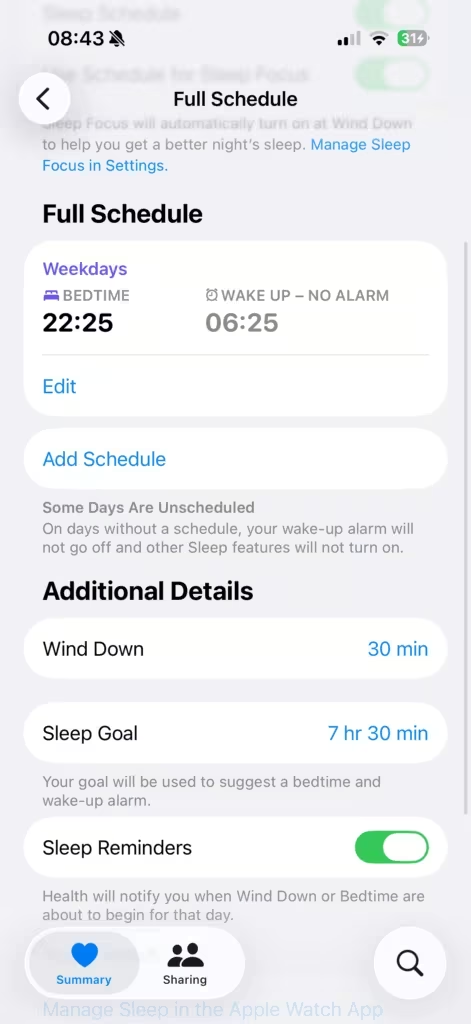
2 things will still break a night of data if you ignore them. Charge your watch to at least 30% before bed, if the battery dies overnight, you lose the data entirely. And wear the watch for a minimum of 1 hour continuously, Apple Watch needs at least that to generate stage data.
Fit matters too. A loose watch registers too much movement and throws off stage detection. Same snug-but-comfortable fit you’d use for a workout.
Why Sleep Focus actually matters
| Feature | Without schedule/ Sleep Focus | With schedule + Sleep Focus |
|---|---|---|
| Basic sleep time | ✅ Tracks asleep vs. awake (1+ hr wear) | ✅ Tracks + aligns to your goal |
| Sleep stages (REM/Core/Deep) | ⚠️ Unreliable – technically possible since watchOS 11 if sleep exceeds 3 hrs, but many users report no data or partial data without Sleep Focus active | ✅ Full stage detection |
| Sleep Score | ⚠️ Inconsistent – may not generate without Sleep Focus; consistency component builds over 13 nights regardless | ✅ Generates each morning; consistency improves over time |
| Notifications | ⚠️ Normal — can wake you up | ✅ Silenced, display dimmed |
| Battery | ⚠️ Higher (display + notifications active) | ✅ Reduced (display off, distractions limited) |
| Wind-down reminder | ❌ No | ✅ Watch reminds you before bedtime |
What Apple Watch tracks while you sleep
Apple Watch captures 6 types of data overnight. Latest addition is HRV, only available on Apple Watch series 12 and Apple Watch Ultra 4.
- Sleep stages. The Watch estimates time in each of 4 states: Awake, Core (light sleep), Deep, and REM. This is the most useful layer: it shows the structure of your night, not just the length.
- Heart rate. Logged continuously, giving you a resting heart rate reading and showing how your heart rate moves across sleep cycles.
- Respiratory rate. How many breaths per minute while sleeping, typically 12 to 20. Sustained changes here can be an early signal worth paying attention to.
- Wrist temperature. Available on Series 8 and later. Tracks nightly skin temperature deviation from your personal baseline. A consistent overnight elevation often flags illness or unusual stress before you feel it.
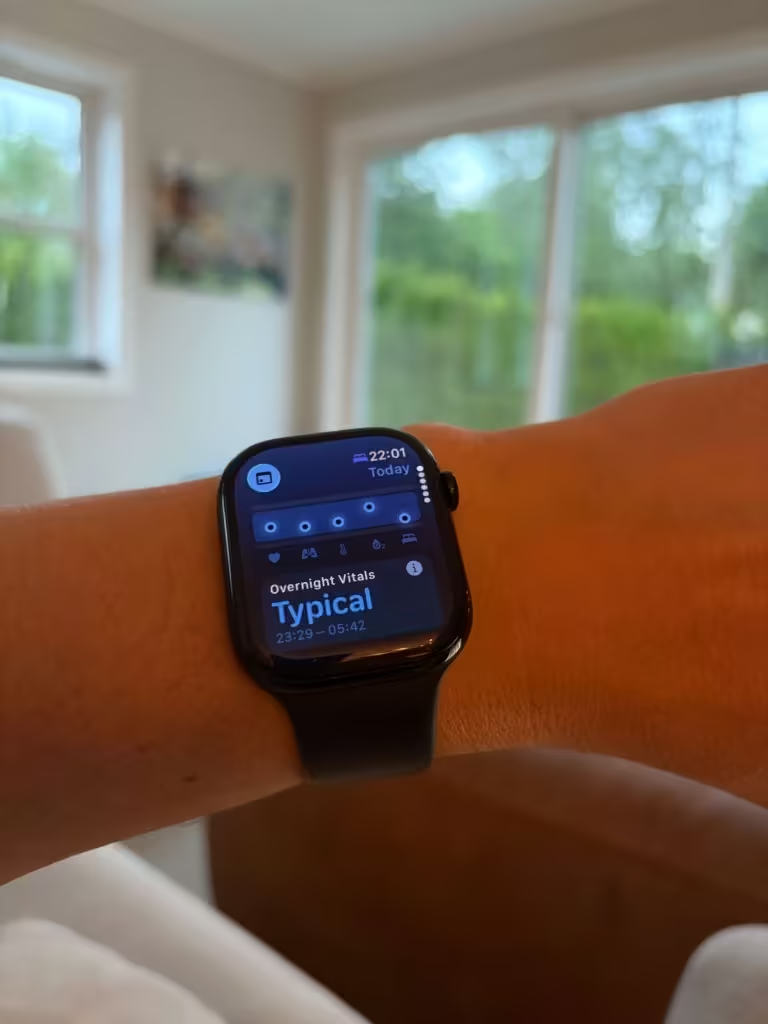
- Blood oxygen (SpO₂) – On supported watches, the watch takes background readings during sleep and stores them in Health; these appear in your overnight history and in the Vitals app as one of the five key overnight metrics
- Heart rate variability (HRV). Measures millisecond variations between heartbeats during sleep. On Series 12 and updated watchOS versions, overnight Recovery HRV is logged continuously to evaluate physical stress and baseline recovery in the Vitals app. The overnight HRV is part of Apples new Health Sensing System change, not something that applies to older models.
Sleep apnea detection: what the watch can and can’t tell you.
On Apple Watch Series 9 or later, Ultra 2, and SE 3 with the latest watchOS, the watch can monitor breathing disturbances during sleep and may notify you after a 30-day evaluation period if it detects consistent signs of moderate to severe sleep apnea. The watch can flag a potential problem. A doctor confirms it. If you receive a Sleep Apnea Notification, you should discuss it with a healthcare provider. It is intended for adults 18 and older who have not already been diagnosed with sleep apnea
How Apple Watch sleep tracking actually works
3 sensors run while you sleep.
The optical heart sensor reads pulse rate and heart rate variability throughout the night (note that this uses different technology than the electrical sensor used for an Apple Watch ECG). The accelerometer detects micro-movements, breathing rhythm, and shifts in body position. On Series 8 and later, the wrist temperature sensor adds a third signal stream to the model.
Apple’s machine learning algorithm maps those signals to sleep stages. The research is published: 1,171 nights from 858 participants, validated on a separate 299 nights from 166 more. The study included people with sleep apnea and other disorders, not just healthy sleepers. You can read the full report here.
Key findings:
- Sleep vs. wakefulness: over 90% agreement with clinical polysomnography
- Specific stage identification (particularly deep sleep): drops to around 62%
- Tested on: healthy sleepers and people with sleep apnea and other disorders
How it compares: Apple Watch vs. Oura Ring vs. Amazfit Bip 6
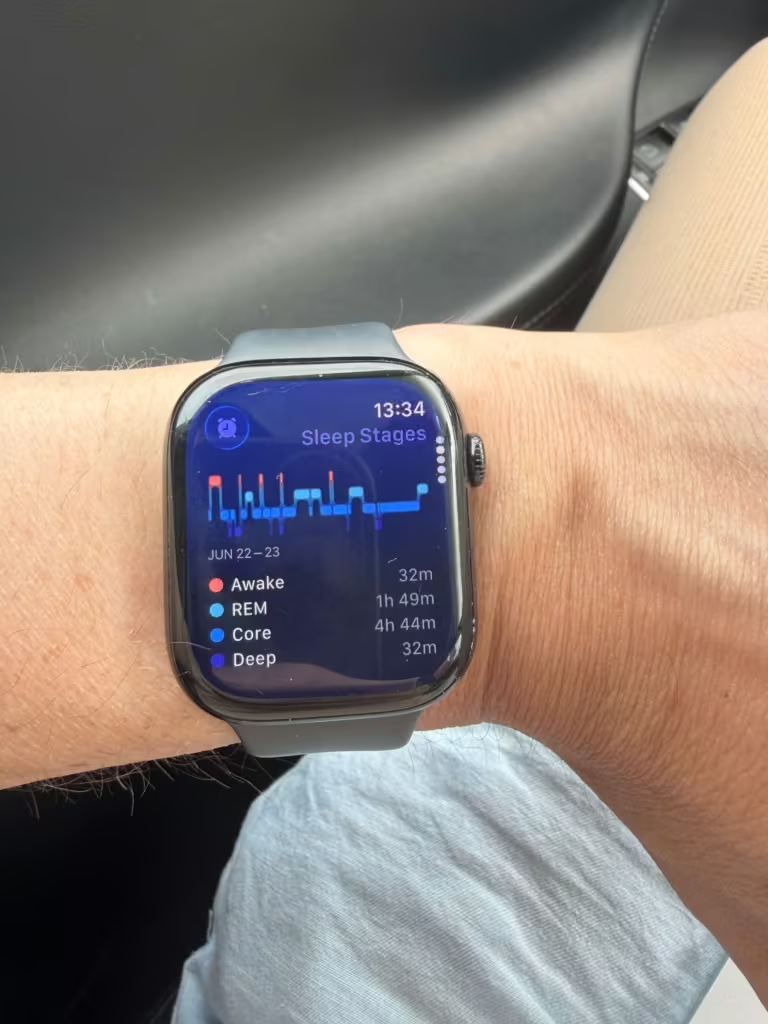
The accuracy study says specific stage detection drops to around 62%, particularly for deep sleep. I wanted to see what that looks like on the wrist.
I wore the Apple Watch and Amazfit Bip 6 on the same night. Same body, same sleep.
| Device | REM | Deep sleep | Deep as % of total |
|---|---|---|---|
| Apple Watch | 1h 49m | 32m | ~7% |
| Amazfit Bip 6 | 1h 25m | 1h 7m | 15% |
They were in the same ballpark for total sleep time. Where they split: deep sleep. Apple Watch logged 32 minutes. The Amazfit Bip 6 logged 1 hour 7 minutes on the same night.
I’ve seen the same pattern wearing Apple Watch alongside an Oura Ring on a separate night: Apple Watch came in lower on deep sleep there too.
Consumer trackers can’t match clinical polysomnography, and no one should expect them to. But if you’re tracking deep sleep specifically, the number you’re looking at is an estimate, and the gap between devices can be significant.
What I use it for: trends on the same device over time. If your deep sleep is 7% one week and 13% the next, something changed. That direction is real, even if the exact figure is approximate.
Independent research supports these observations
Independent research supports these observations. A 2024 study published in Sensors (Robbins et al.) tested the Apple Watch Series 8 head-to-head with the Oura Ring Gen3 and Fitbit Sense 2 against clinical polysomnography (gold standard sleep lab test) in 35 healthy adults.
Key results:
- All three devices were highly accurate at distinguishing sleep from wake (≥95% sensitivity).
- For sleep stages, the Oura Ring performed best overall, while the Apple Watch showed strong performance on REM but underestimated deep sleep by an average of 43 minutes and overestimated light sleep.
- The researchers concluded that the devices show moderate to substantial agreement with lab measurements in healthy adults and are useful for tracking overall sleep patterns, though not perfect for precise stage durations.
This matches what I’ve seen personally: Apple Watch tends to be more conservative on deep sleep compared to other consumer devices. Remember, use the same device consistently and focus on trends.
| Study/Source | Apple Watch Deep Sleep Performance | Notes |
|---|---|---|
| Apple’s Validation Study | ~62% accuracy | Compared to PSG (gold standard for sleep tracking) |
| Robbins et al. 2024 (PSG) | 50.5% sensitivity; underestimated by ~43 minutes | Independent study vs. gold-standard PSG |
Where to find your sleep tracking data
Apple Watch sleep tracking runs across 2 places.
The Sleep app on your watch shows a quick morning summary: your sleep score, time asleep, and a stage breakdown from the previous night. Turn the Digital Crown to scroll through up to 14 days of history.
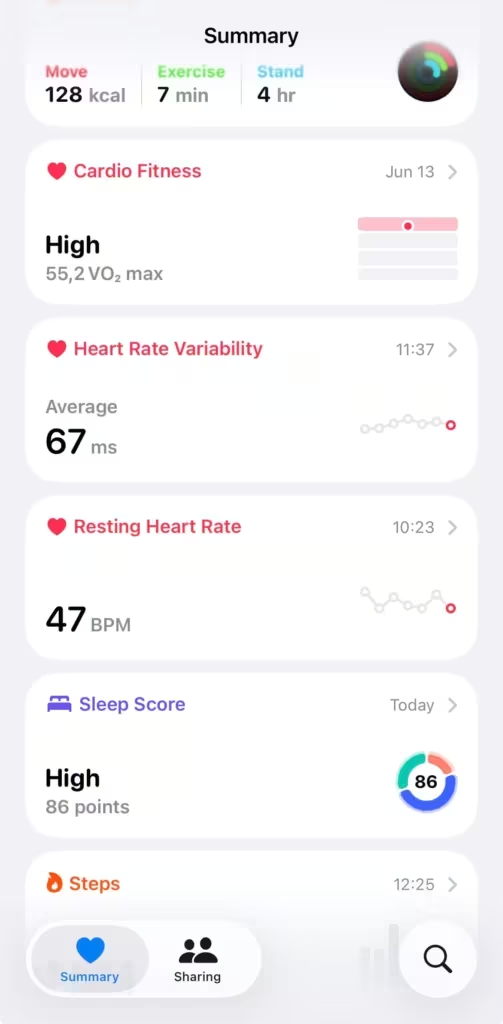
The full data is in the Health app on your iPhone. Here’s how to get there:
- Open the Health app
- Scroll down on your summary view and select “Sleep Score” or tap Search at the bottom
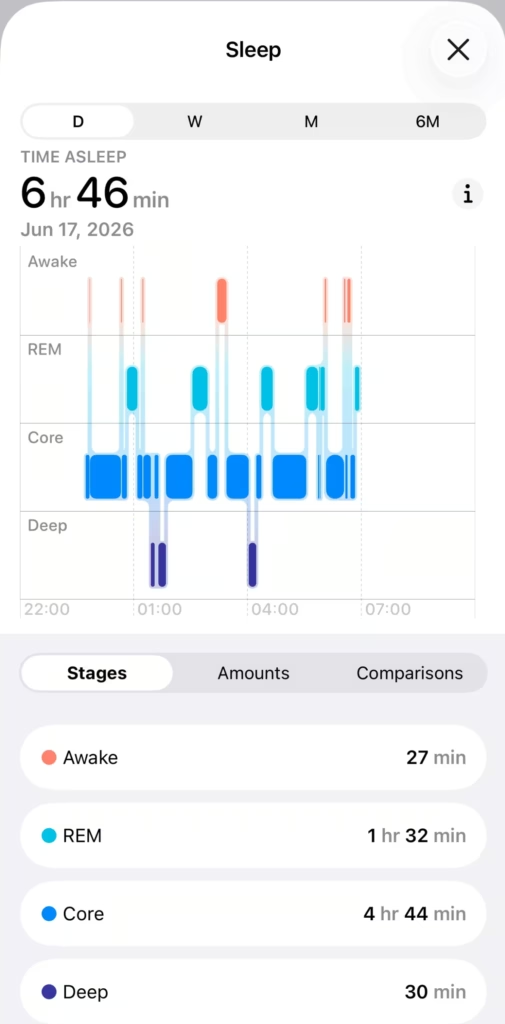
- Tap “Sleep” to enter full view on sleep stages
- Tap Show More Sleep Data
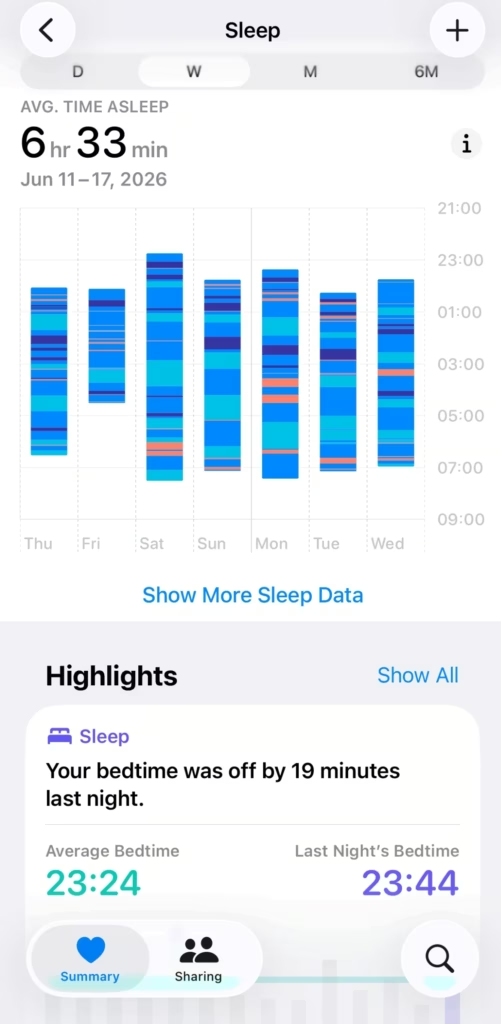
Tap Stages to see a color-coded graph of your entire night. Tap W at the top to switch to the weekly view. That’s where patterns start to emerge. You can also see heart rate and respiratory rate overlaid against your sleep timeline under Comparisons.
The sleep score: what it measures and what it ignores
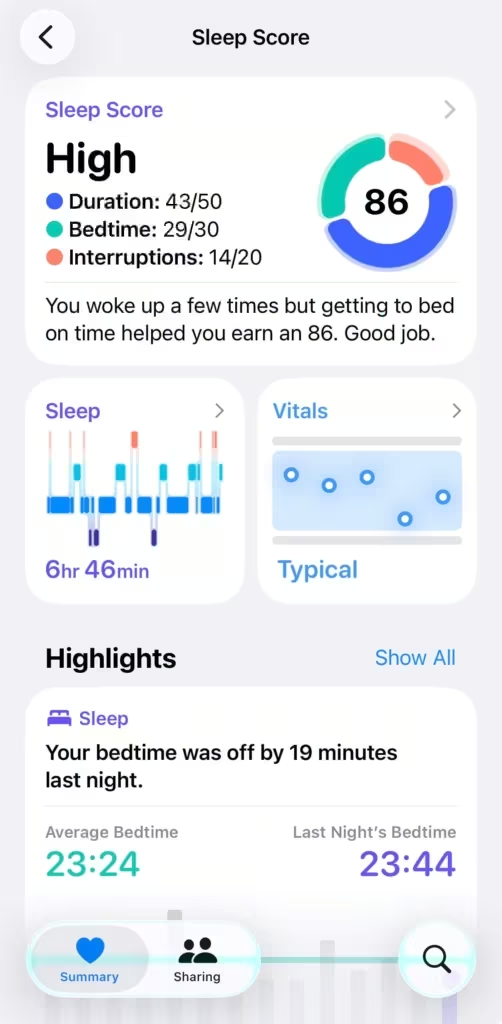
Every morning, Apple Watch generates a Sleep Score from 0 to 100. The formula has 3 inputs: sleep duration (50 points), bedtime consistency (30 points), and interruptions (20 points).
| Score range | Classification | What it means |
|---|---|---|
| 0–40 | Very Low | Duration, consistency, or interruptions are significantly off |
| 41–60 | Low | One or more inputs are consistently falling short |
| 61–80 | OK | Functional sleep, room for improvement |
| 81–95 | High | Consistent, long enough, with minimal interruptions |
| 96–100 | Very High | Near-optimal on all 3 inputs |
Sleep stages don’t factor into the score at all. I’ve noticed this myself. I’ll sleep 7 hours with barely any deep sleep and still score in the OK or High range, because I slept long enough and at a consistent time.
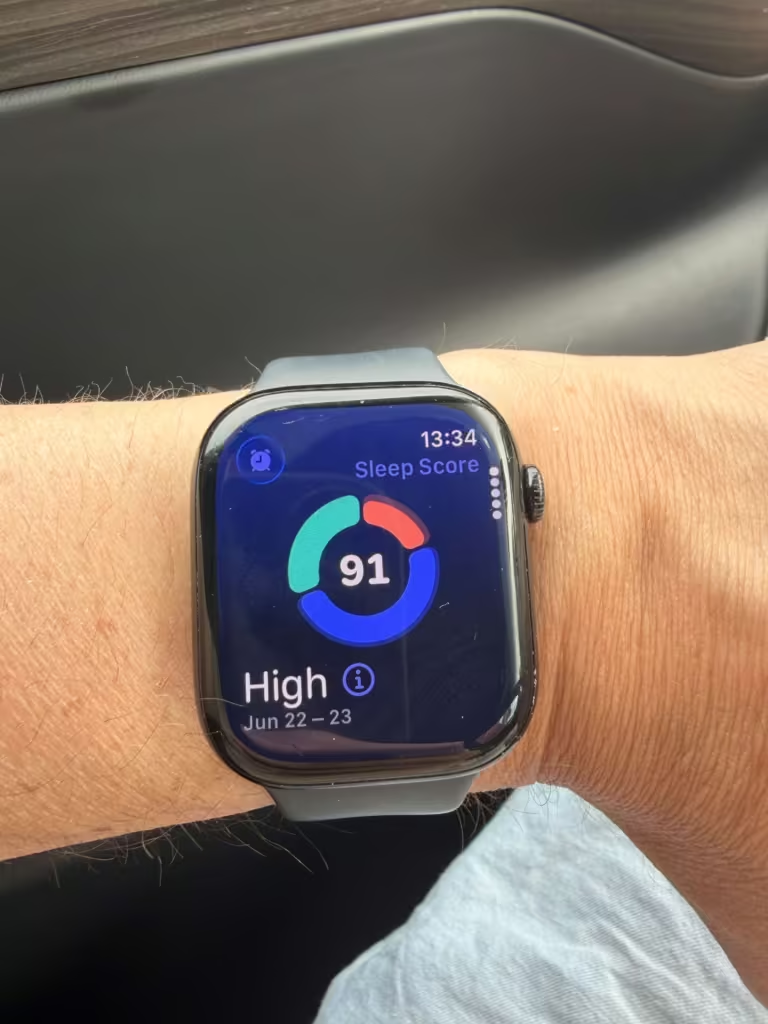
That’s a real gap. Brands like Oura build their Readiness Score from HRV trends, sleep stage quality, overnight temperature, and sleep consistency combined. Their score reflects how recovered your body actually is. Apple’s score reflects whether you slept long enough and consistently enough. Both are useful, but they’re measuring different things.
Use the score to track your habits. Use your stages to understand the quality underneath.
What to actually do with the data
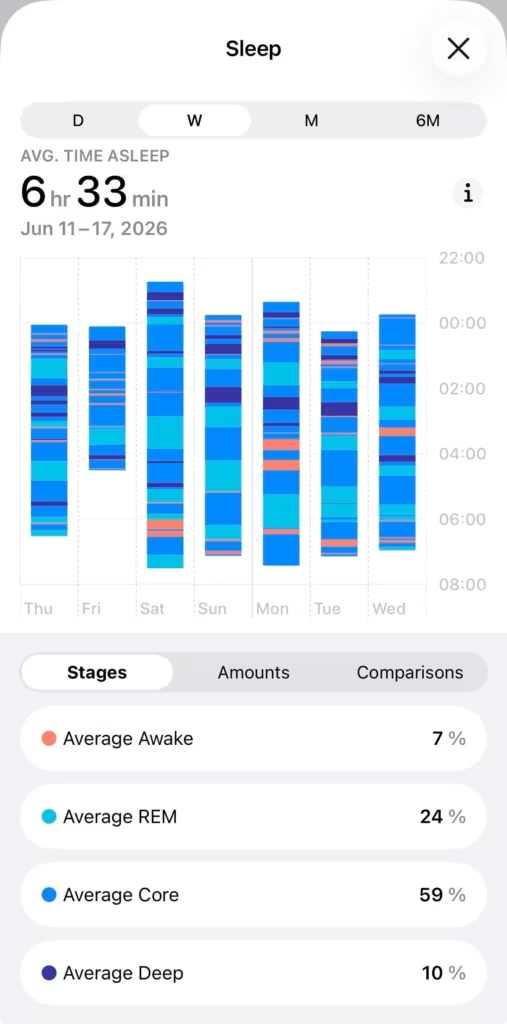
Start with the weekly view. Open the Health app, tap Sleep, and switch to W on any graph. You’re looking for patterns across 7 days, not a single night.
| What you’re seeing | Where to look | What to do |
|---|---|---|
| Sleep Score consistently Low or below | Sleep Score breakdown | Check which input is the problem: duration, consistency, or interruptions |
| Deep sleep below 10–15% of total sleep time | Stages view (weekly) | Look at alcohol timing, room temperature, sleep schedule consistency |
| REM below 15–20% of total sleep time | Stages view (weekly) | Check for sleep debt and afternoon caffeine |
| Multiple metrics outside your baseline at once | Vitals app | Back off training load, monitor for illness |
Quick context: The Sleep app handles the tracking: duration and stages. The Vitals app takes that data and layers in overnight heart rate and temperature to show how your body actually recovered. Two different jobs.
For a full explanation of how Vitals works, see the Apple Watch Vitals explained post.
Dig deeper into your sleep data
Under Sleep, tap Show More Sleep Data, then tap Comparisons. This overlays your heart rate, respiratory rate, and wrist temperature directly against your sleep stages for the same night.
3 things worth paying attention to here:
- Heart rate: A consistently elevated heart rate during sleep (higher than your usual overnight range) often signals your body is under stress, fighting something off, or not recovering well. If it’s high and your sleep duration is also low, that’s a compounding problem.
- Respiratory rate: Normal range is roughly 12–20 breaths per minute. A sustained spike above your personal baseline, especially overnight, can be an early indicator of illness or elevated strain. Worth noting if it stays elevated across multiple nights.
- Wrist temperature: Available on Series 8 and later. Shows your nightly deviation from your personal baseline. A consistent positive deviation often shows up 1–2 days before you feel sick.
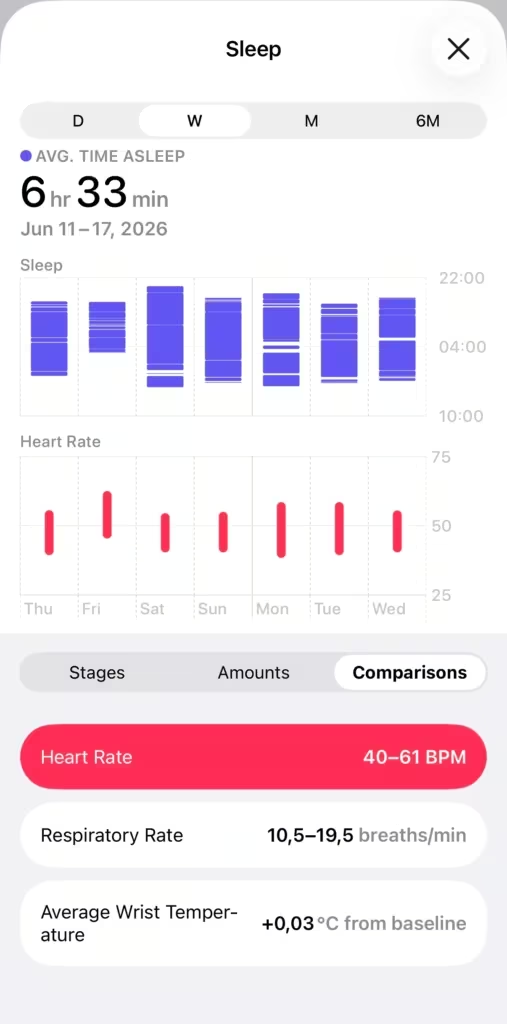
None of these replace a doctor. But spotting patterns across a week tells you things that a single night’s sleep score won’t. My article on training load explains how cumulative strain adds up and what to do about it.
Which Apple Watch you need
| Feature | Minimum requirement |
|---|---|
| Sleep stages (REM, Core, Deep, Awake) | Series 4 or later, watchOS 9 or later |
| Wrist temperature tracking | Series 8, Series 9, Series 10, Series 11, or any Ultra |
| Sleep apnea notifications | Series 9, Series 10, Series 11, Ultra 2, or SE (3rd gen) with watchOS 11 |
| Sleep Score | Available on all models that support sleep tracking |
Most people reading this already have sleep stage tracking. Series 4 covers it. The wrist temperature sensor on Series 8 and later is the one upgrade that actually changes what you can see overnight.

The data’s been there every night you’ve worn your watch to bed. The question is just whether you’re looking at it.
Sources
Estimating Sleep Stages from Apple Watch — Apple Research (Oct 2025)
Track your sleep on Apple Watch and use Sleep on iPhone — Apple Support
Track your sleep with Apple Watch — Apple Support
View your sleep score on Apple Watch — Apple Support
Sleep apnea notifications on your Apple Watch — Apple Support
Use Focus on Apple Watch — Apple Support
Accuracy of Three Commercial Wearable Devices for Sleep Tracking in Healthy Adults