
By Wearablewhiz / Published June 24, 2026 · Updated June 27, 2026
I noticed my resting heart rate had crept up eight beats over three weeks. There were no obvious symptoms and I felt fine day to day, but the numbers in Apple Health kept climbing. Harvard Health puts it simply, a rising resting heart rate over time can be a signal worth watching. In my case, it turned out to be under-recovery from training.
Important: This article is for informational purposes only and is not a substitute for professional medical advice. Significant or sustained changes in your resting heart rate, especially with symptoms like dizziness, fatigue, chest pain, or shortness of breath, should be discussed with a doctor.
Key Takeaways: Apple Watch Resting Heart Rate
If you want a simple way to understand how Apple Watch calculates your resting heart rate, what a sudden change in your numbers means, and how to use this data to track your recovery, here is the quick bottom line:
- How it’s measured: Apple Watch calculates RHR by taking background readings only when you are stationary and inactive for a sustained period during the day.
- Rising trends: A steady increase in your baseline RHR (like a 5–10 bpm jump) is best viewed as a possible warning sign rather than a definitive signal. It can reflect training stress, sleep loss, dehydration, environmental heat, alcohol consumption, or simple measurement variation.
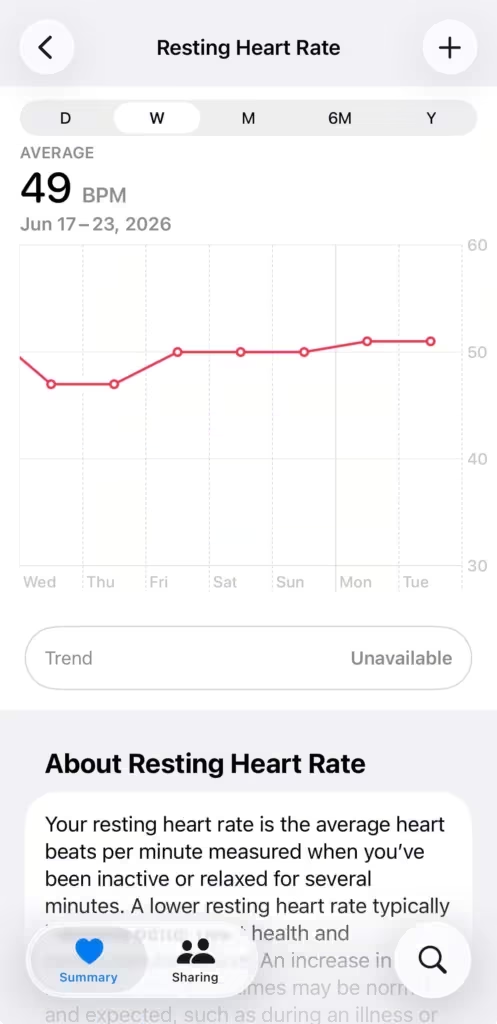
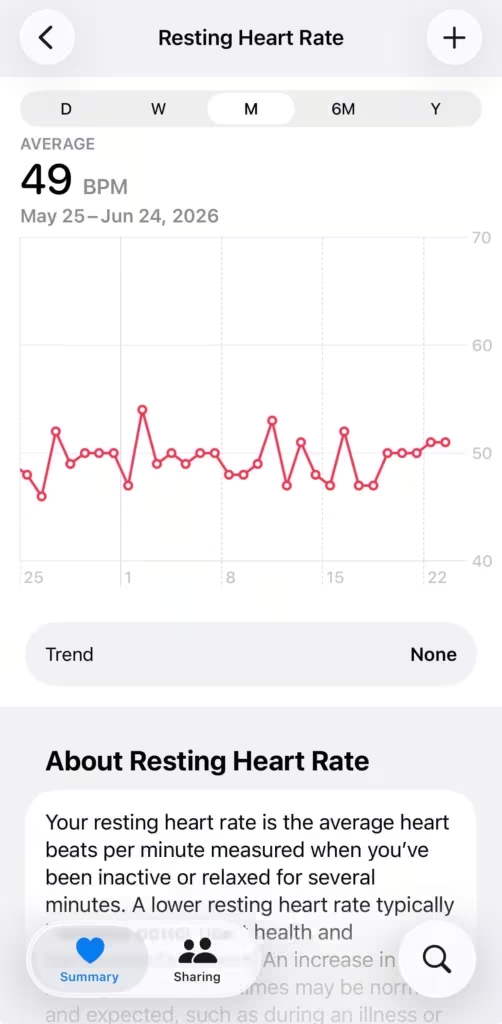
- Context is king: Single-day spikes happen, but you should look at the weekly (W) and monthly (M) views in the Health app to spot true baseline shifts.
- Connecting the metrics: For broader context, you can cross-reference your RHR with overnight metrics in Apple’s Vitals app and your HRV (Heart Rate Variability) trends, keeping in mind that these features track overall wellness deviations and do not diagnose illnesses.
What resting heart rate actually tells you
Resting heart rate (RHR) is how many times your heart beats per minute when you’re awake and still. No workout, no caffeine spike, no acute stress. Your baseline.
It’s one of the simplest signals your body produces. It reflects how hard your heart has to work to keep everything running.
A lower RHR generally means your heart is more efficient. It pumps more blood per beat, so it doesn’t need to beat as often. Elite endurance athletes often sit in the 40s or low 50s. Most healthy adults land somewhere between 60 and 100 bpm, with a lot of individual variation based on age, fitness, genetics, and medications.
Where you fall within that range matters less than you’d think. What matters is whether your number is stable, and whether it’s moving in a direction worth paying attention to.
RHR and HRV are the 2 metrics that tell you the most about recovery — they’re different measurements of the same underlying system. If you haven’t looked at your HRV yet, this breakdown of Apple Watch HRV is worth reading alongside this one.
How Apple Watch measures your resting heart rate
Apple Watch uses photoplethysmography, the optical method behind its heart-rate sensor. In the background, Apple Watch uses infrared light to measure heart rate, while its green LEDs are used for workouts and certain other readings. Blood absorbs infrared light, so when your heart beats and blood flow increases, the absorption changes. By measuring changes in light absorption as blood flow changes, Apple Watch calculates your heart rate.
When you’re not working out, Apple Watch takes background heart-rate readings throughout the day when you’re still, and it calculates resting rate by correlating those readings with accelerometer data when it has enough readings. Your daily resting rate is built from those quiet windows. Apple’s documentation does not explicitly say that sleep readings are excluded, so it’s safer to say the watch focuses on background readings taken while you’re still. Apple focuses on awake, inactive periods throughout the day. Overnight readings contribute more to other metrics (like HRV or Vitals) but are generally filtered out for the official daily Resting Heart Rate.
So Apple Watch isn’t taking one reading and calling it done. It’s filtering a stream of passive data down to an estimate of your actual resting state.
On days when you haven’t worn the watch enough, or when the fit was poor, you might not see a number. The watch needs sufficient background readings before it’ll publish a resting rate.
Where to find your resting heart rate
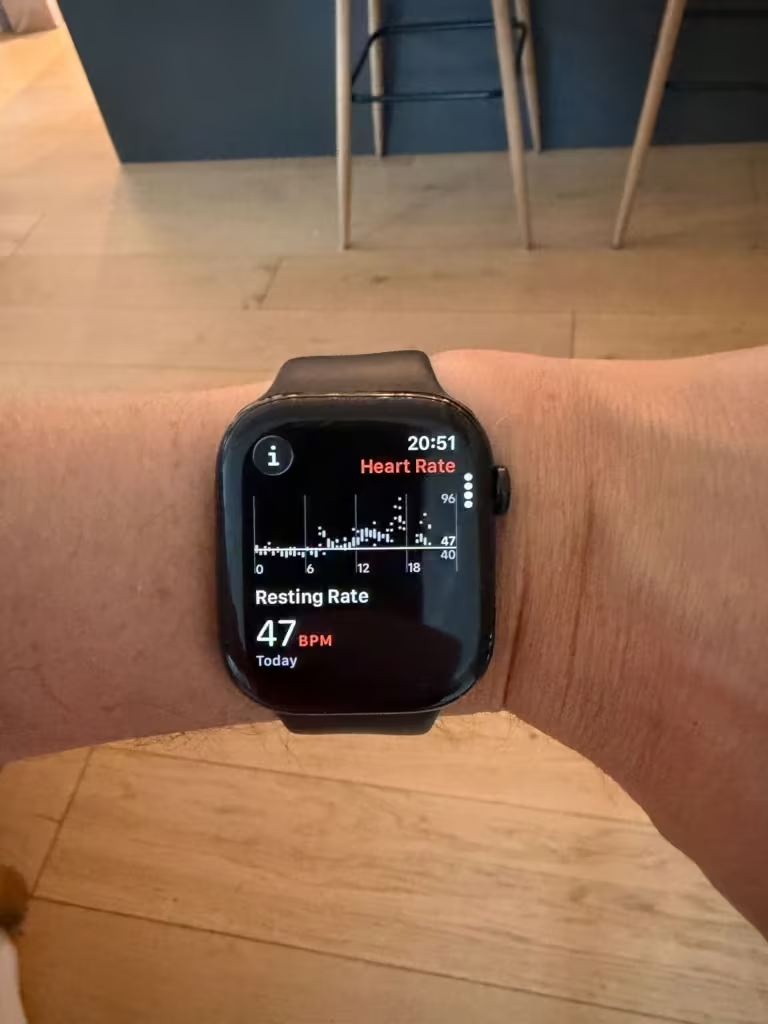
On your Apple Watch: Open the Heart Rate app and turn the Digital Crown to view different heart-rate views, including Resting Rate and Walking Average.
In Apple Health on your iPhone: In the Health app on your iPhone, tap Browse, then Heart, then Resting Heart Rate to see your data over time. You can view the chart by hour, day, week, month, or year.
The week view is a reasonable starting point. It gives you enough data to spot a shift without drowning in single-day noise. Once you’ve got a month or two of data, the month view becomes much more useful.
Your overnight RHR also shows up in the Apple Watch Vitals app alongside your respiratory rate, wrist temperature, sleep duration, and blood oxygen. If that morning summary confuses you, here’s what each number in Vitals actually means.
RHR ranges: what the numbers generally mean
| Range | What it typically indicates | What to consider |
|---|---|---|
| Below 60 bpm | Low / athletic | Common in regular exercisers. If you’re fit and feel fine, this is healthy. If you’re sedentary and feel faint or fatigued, worth a conversation with a doctor. |
| 60–70 bpm | Good | Associated with solid cardiovascular fitness for most adults. |
| 71–80 bpm | Average | Normal for most healthy adults. No action needed unless it’s trending up. |
| 81–100 bpm | Elevated but within normal | Still within the clinical normal range. Worth tracking. Consistently sitting here warrants a checkup. |
| Above 100 bpm at rest | High (tachycardia) | Consistently above 100 bpm at rest is a reason to talk to a doctor. |
One caveat: these ranges are population averages. Your personal baseline is the more useful reference point, and the next section is where that becomes practical.
Factors That Influence Resting Heart Rate
Many factors beyond fitness can influence your resting heart rate:
- Age: RHR tends to increase slightly with age.
- Gender: Women generally have a slightly higher average RHR (about 2–7 bpm) than men due to differences in heart size and hormones.
- Medications: Beta-blockers lower RHR; stimulants, certain antidepressants, or thyroid medications can raise it.
- Health conditions: Anemia, hyperthyroidism, dehydration, infections, sleep apnea, or chronic stress can elevate it. Conversely, some heart conditions can lower it.
- Lifestyle: Caffeine, alcohol, smoking, poor sleep, heat, and even recent intense training sessions play a role.
Always consider your personal context rather than comparing strictly to population averages
What to do with your resting heart rate data
Here’s the gap Apple leaves open: it records your RHR every day but doesn’t tell you whether your trend is meaningful, or alert you when your number climbs away from your usual baseline. You’re handed the raw data without the context.
The fix is straightforward: you have to read the graph yourself, and you have to read it over time.
Pull up the month view in Apple Health. Look at the direction of the line, not individual daily numbers. Is it slowly declining over the past several weeks? That usually reflects improving cardiovascular fitness or better recovery. Is it creeping upward? That can signal accumulated fatigue, illness starting to develop, sleep debt stacking up, or alcohol from nights earlier in the week.
A few specific things to watch for:
When you start a new training routine, your RHR might rise slightly for the first 2-4 weeks before it drops. Your body is adapting. Give it time before judging the trend.
If your RHR spikes 5 or more beats above your recent baseline and stays there for multiple days, that’s a signal worth taking seriously. Common causes: illness (sometimes days before you feel any symptoms), overtraining without enough recovery, alcohol, or sustained stress.
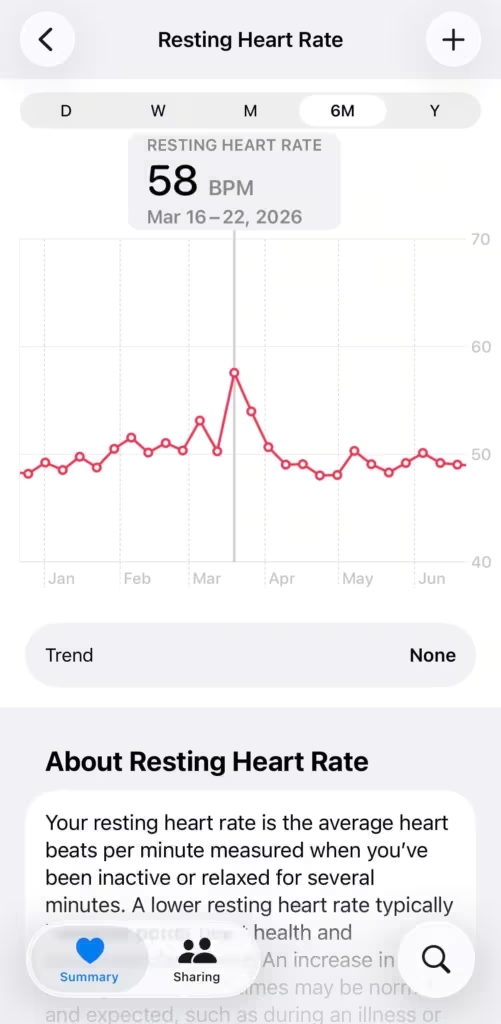
In March this year I got properly sick, the kind where you spend a few days in bed. Before I felt anything, my resting heart rate had already climbed to 58. My usual sits around 48. That’s a 10-beat spike, and it showed up in Apple Health as a clear visual jump in the monthly chart. Looking back at the data, the rise started a day or two before I felt ill. The Watch knew before I did.
Day-to-day variation of 2-4 bpm is normal noise. A single high reading doesn’t mean much.
Getting more out of the data:
Apple Health gives you everything you need to track the trend yourself. If you want a readiness score that factors your RHR in alongside HRV and sleep automatically, Training Today does this — it pulls from Apple Health and replaces the manual chart-reading with a single daily number.
I wrote a full guide on how to combine RHR, HRV, and sleep into a simple daily recovery number – building a daily recovery score with Apple Watch, if you want to go deeper on that.
The Apple Watch you need for this
Resting heart rate tracking has been available since Apple Watch Series 1. Any watch on your wrist right now is capable of this. If you’re due for an upgrade and want the full health feature set, Apple Watch Series 11 is the current model.

Your resting heart rate is one of the most honest signals your watch collects. It doesn’t require a deliberate measurement or a morning routine. The Watch figures it out while you’re just living your day. All you have to do is check the line every once in a while. Know what you’re looking at when you do.
Sources:
- Monitor your heart rate with Apple Watch – Apple Support
- Heart rate: What’s normal? – Mayo Clinic
- Heart Health Trends – Apple Heart and Movement Study (2026)
- Abnormal resting heart rate may predict heart failure or death – American Heart Association
- Daily resting heart rate variability in 92,457 adults – NIH/PMC
- https://www.health.harvard.edu/blog/increase-in-resting-heart-rate-is-a-signal-worth-watching-201112214013