
By Wearablewhiz / Published June 12, 2026 · Updated October 6, 2026
Every morning I check 3 things before I get out of bed. HRV in the Health app. Training Today to see if I’m ready to train. Then Vitals.
Most mornings it takes 10 seconds. Everything blue, move on. But when something shows pink, that’s when it gets interesting.
Note for Series 12 and Ultra 4 owners: Vitals now includes daytime tracking, high-frequency HRV, and feeds into a new Readiness score. Full details are in the Series 12 & Ultra 4 section below.
Here’s what the app actually is and how to read it.
What is the Apple Watch Vitals App?
Apple Watch Vitals is a built-in app introduced in watchOS 11. It tracks 6 health metrics while you sleep and gives you a morning summary compared against your personal baseline.
The key word is baseline. The app compares your numbers to your own history. Your resting heart rate during sleep is different from mine, and Vitals accounts for that. A number that looks low for someone else might be completely normal for you. Vitals tracks your resting heart rate passively overnight. To see how your heart responds under active physical strain, pair this with your post-workout Heart Rate Recovery.
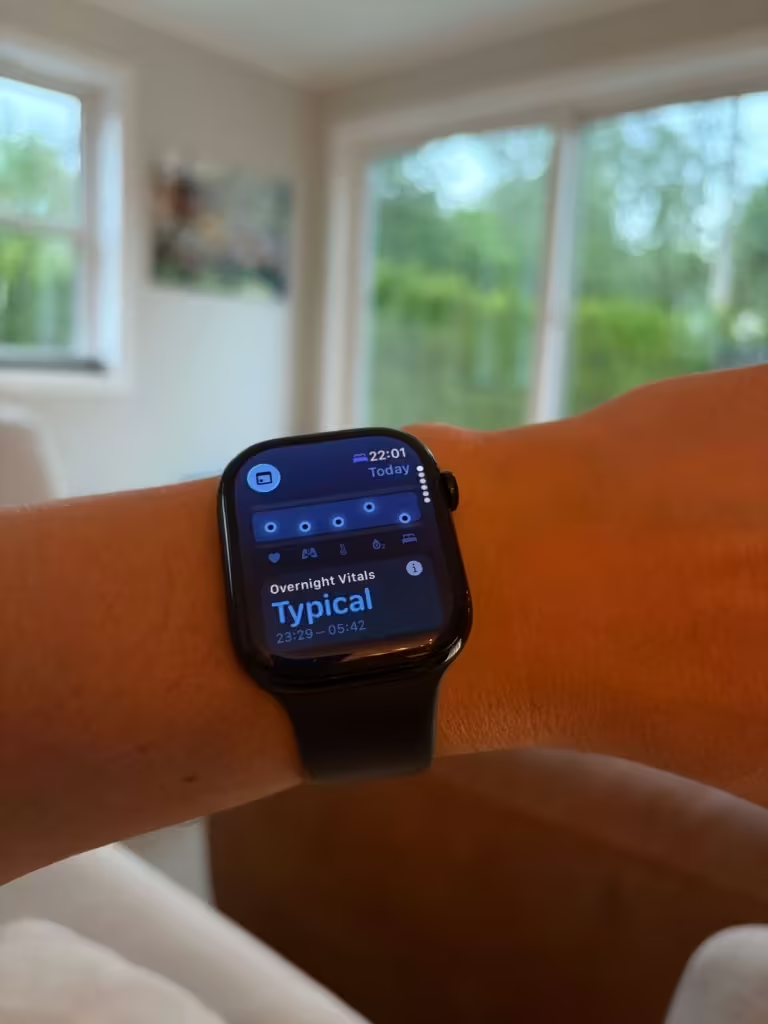
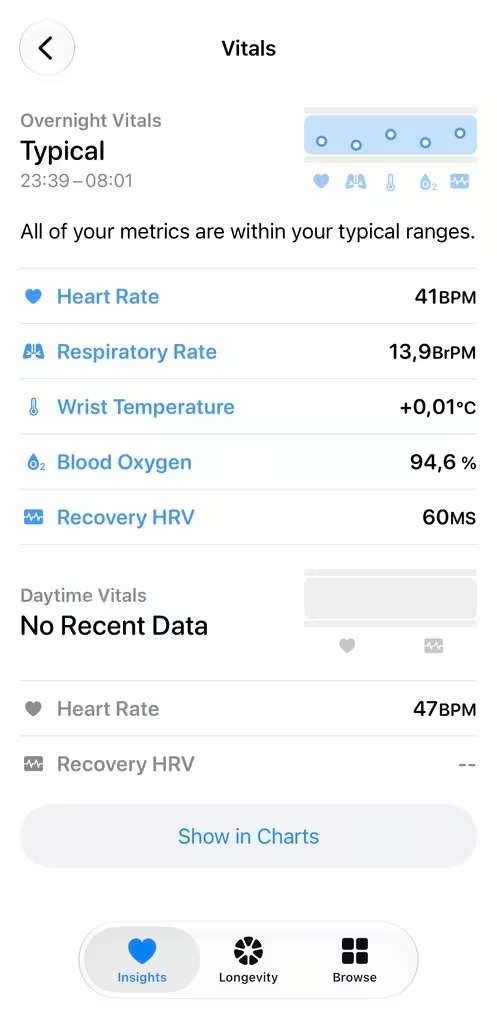
What Health Metrics Does Apple Watch Vitals Track?
On supported Apple Watch models, Vitals tracks these metrics overnight:
- Heart rate — your heart rate during sleep
- Respiratory rate — how many breaths per minute
- Wrist skin temperature — variation from your personal baseline
- Blood oxygen — the percentage of oxygen in your blood
- Sleep duration — total time asleep (covered in depth in the Apple Watch sleep tracking post)
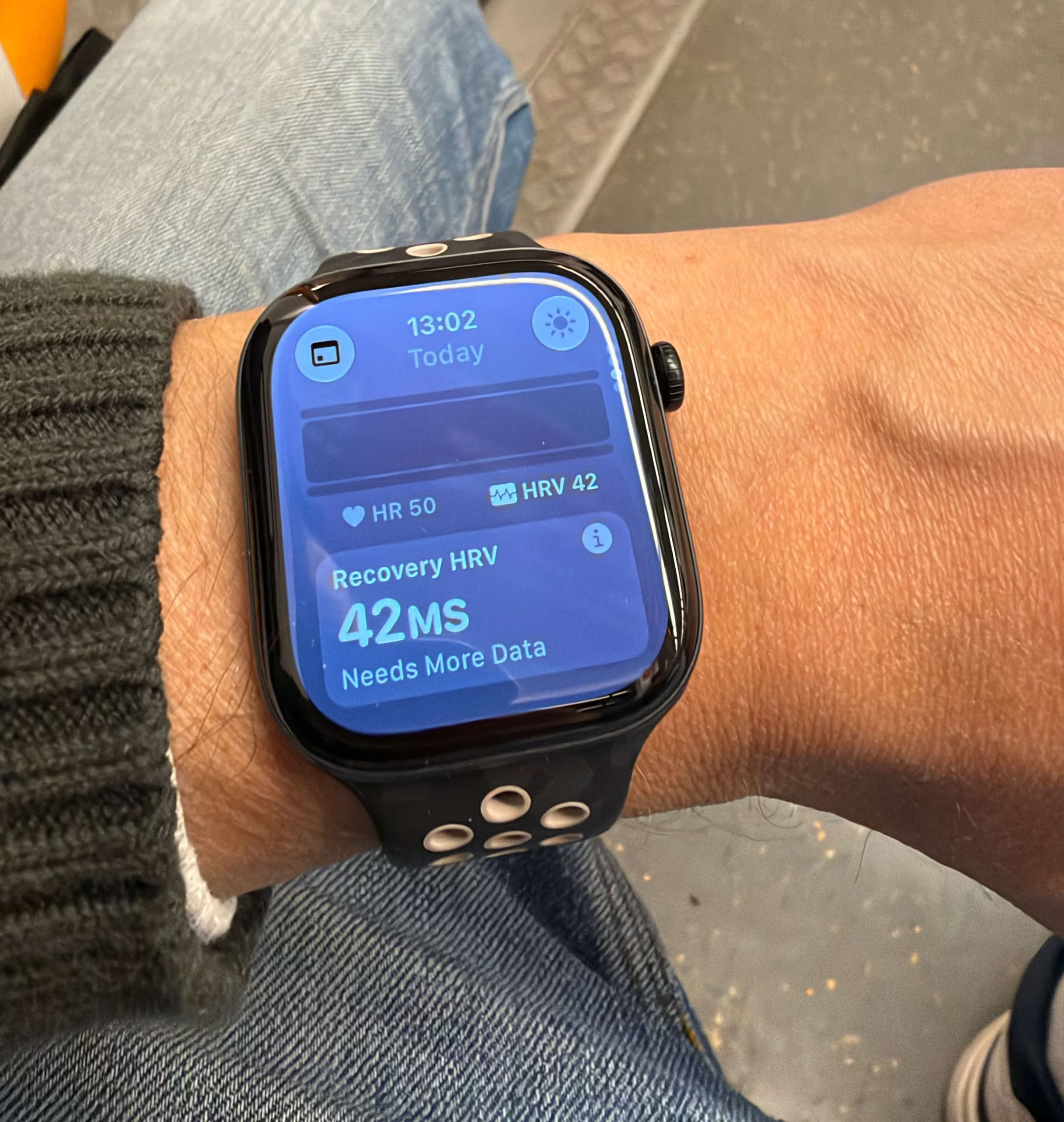
- Heart rate variability (HRV) — a key indicator of recovery and nervous system stress. Included on Series 12 and Ultra 4 as Recovery HRV; measured as often as every 5 minutes.
One accuracy note: heart rate at rest is where Apple Watch performs most reliably. Blood oxygen readings from consumer wearables carry wider margins of error than clinical pulse oximeters. Use it to spot sustained shifts from your baseline, not as a precise medical reading.
One caveat on blood oxygen: if you bought an Apple Watch in the United States on or after January 18, 2024 and your model’s part number ends in LW/A, blood oxygen is not available in Vitals. Apple removed it from those models due to a patent dispute. Check your part number in Settings if you’re unsure.
New in Apple Watch Series 12 & Ultra 4: Daytime Vitals and Readiness Score
Apple Watch Series 12 and Ultra 4 significantly expand Vitals beyond the original overnight-only design.
What’s new?
- Overnight Vitals now includes Recovery HRV (compared against your personal baseline).
- A new daytime Vitals view lets you toggle between overnight and daytime metrics.
- Heart rate is measured as often as every 5 seconds throughout the day.
- HRV is measured as often as every 5 minutes (roughly 24× more frequent than before).
- These higher-frequency readings feed a new Readiness score.
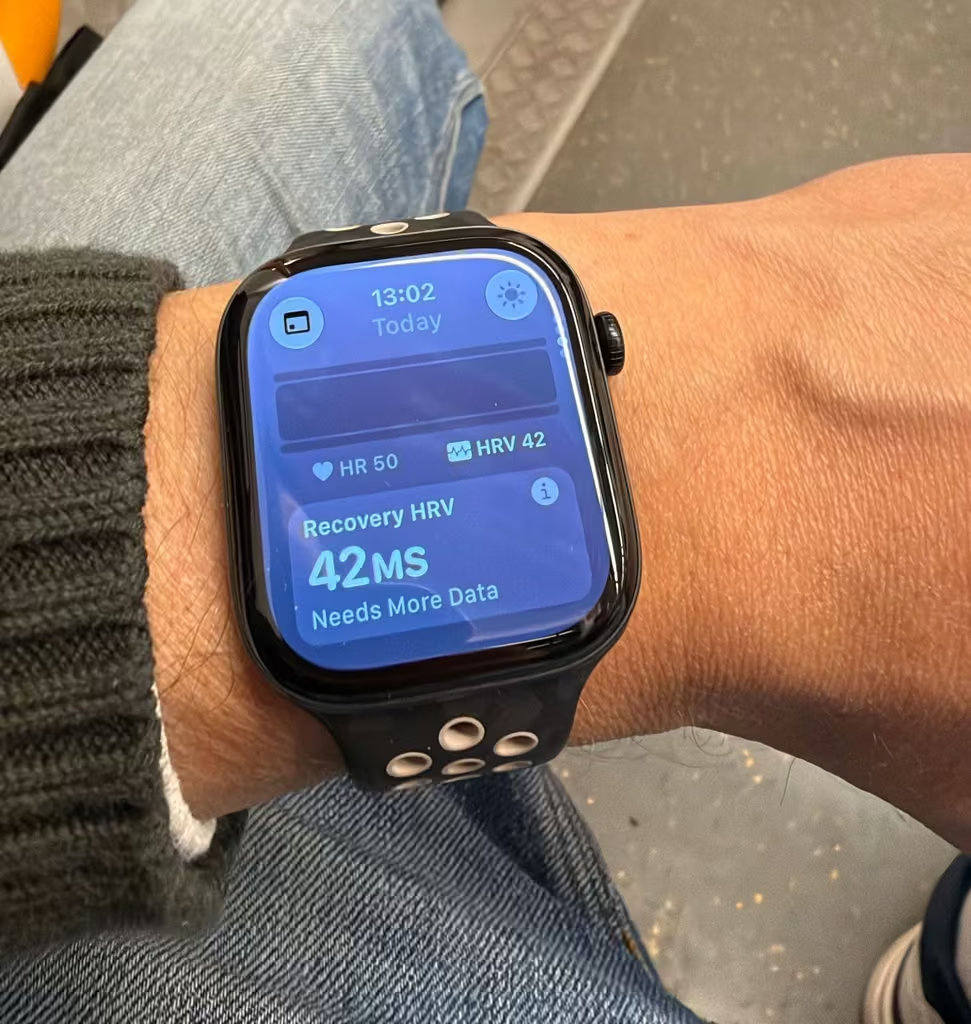
How Readiness works
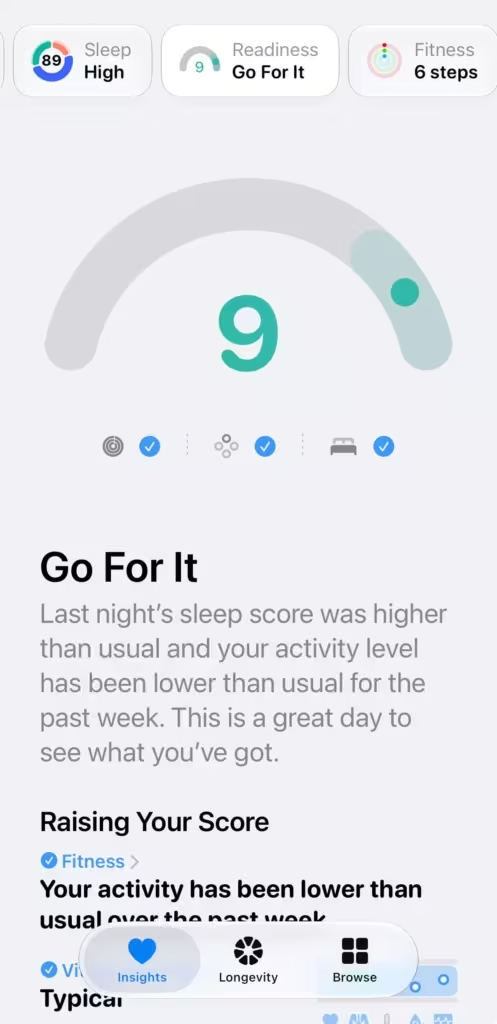
Each morning (and updating throughout the day) you get a simple 0–10 score with one of four recommendations:
- Recover (0–1)
- Pace Yourself (2–4)
- Ready (5–7)
- Go For It (8–10)
The score pulls from recent activity, training load, overnight + daytime vitals, and your sleep score. Higher-than-usual Recovery HRV can push the score up; multiple outliers in Vitals tend to pull it down.
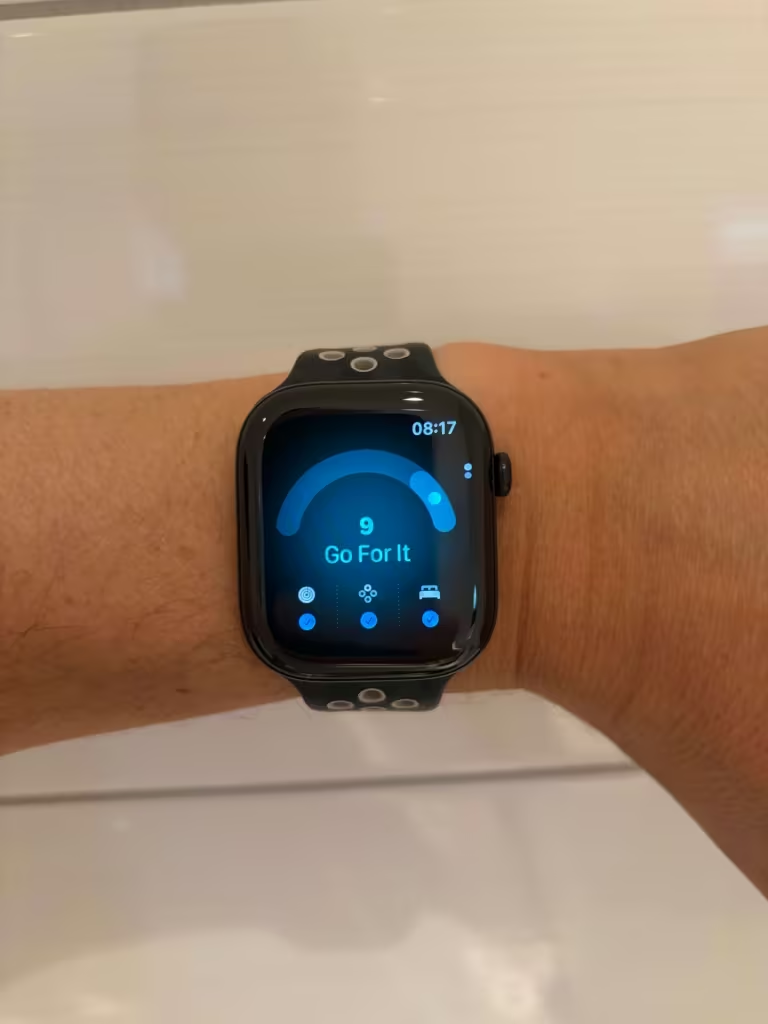
How this changes daily use
On compatible older models, Vitals does not provide the new Series 12 and Ultra 4 daytime view or the new Readiness experience. On Series 12 and Ultra 4, the morning routine becomes:
- Glance at overnight Vitals (blue/pink).
- Check the Readiness score and recommendation.
- Optionally switch to the daytime Vitals view later if something feels off.
The core rule remains the same: one pink metric is usually noise. Two or more pinks, especially when paired with a low Readiness score, is a stronger recovery signal.
How to Read the Apple Watch Vitals Morning Summary
Blue means the metric is within your typical range. Pink means it’s an outlier.
One pink metric on its own is usually noise. Your heart rate runs a bit high after a rough night? Move on. But 2 or more metrics showing pink on the same night is a pattern worth paying attention to. That’s also when Apple Watch sends you a notification.
One thing worth knowing: the baseline takes time to build. You’ll see a count: “12 measurements” or “34 days.” The more data it has, the more accurate your typical ranges become. Give it a few weeks before drawing conclusions.
Understanding Vitals App Trends in Apple Health
The Vitals app in Apple Health has 4 views: D (day), W (week), M (month), and 6M (6 months). You’ll see them as tabs at the top.
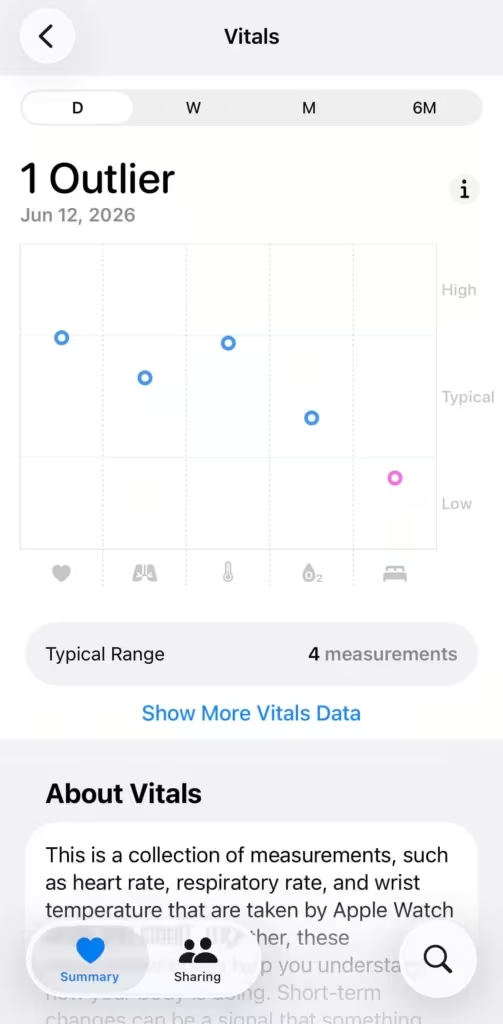
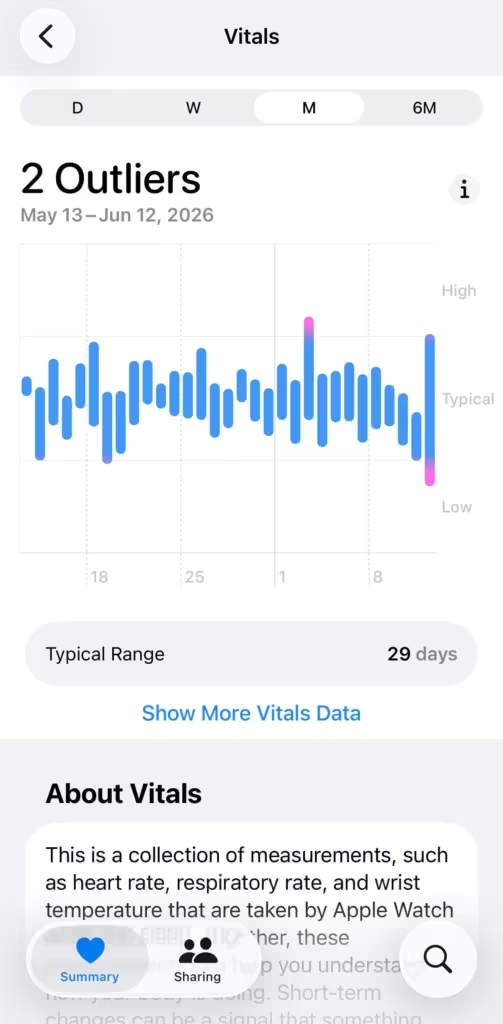
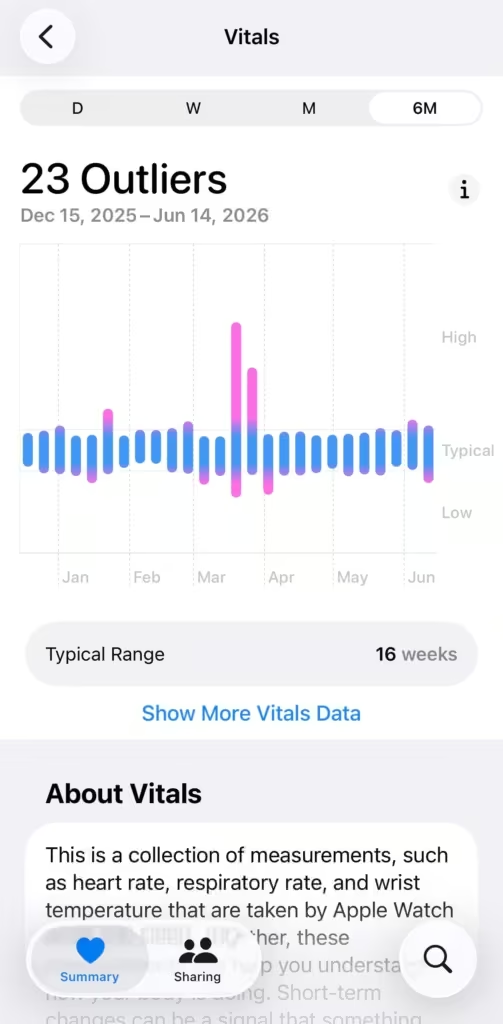
Day view shows individual data points scattered across the day. You can see which metrics are blue (typical) and which are pink (outlier). It also shows the icons for each of the 6 metrics at the bottom so you can see which one is off.
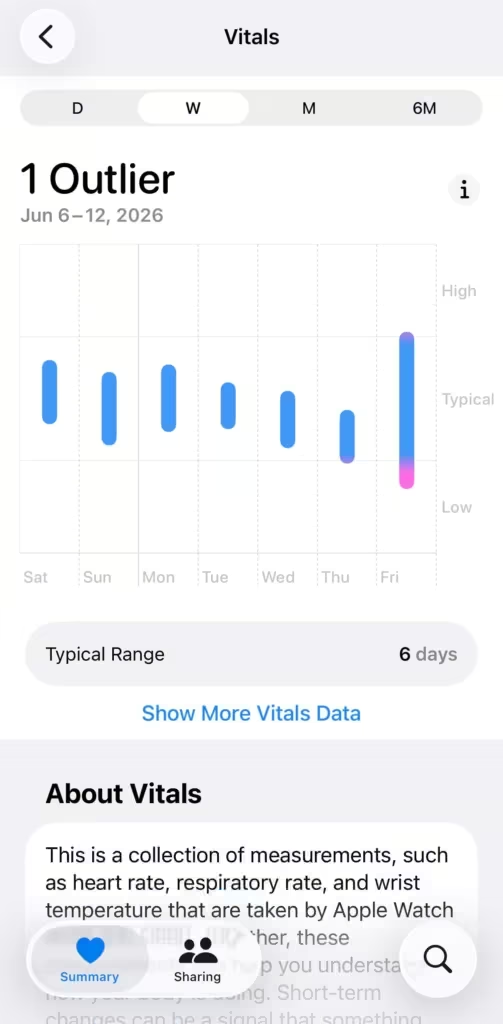
Week view shows a bar for each day. A mostly blue week with one pink day tells a different story than a week where pink shows up repeatedly. This is where patterns start to emerge.
Month view gives you 30 days at a glance. You’ll see your typical range clearly, and outlier days stand out immediately as pink bars.
6-month view is the longest window. This is where you start to see seasonal shifts, the impact of lifestyle changes, or sustained periods of stress or recovery. If you’ve been consistent with sleep and training, you’ll see it here.
How I Use Vitals Every Morning
I check it right after waking up, same time as HRV. On my Series 12 I also glance at the Readiness score.
Most mornings everything is blue and I close the app in 5 seconds. But when something is pink, I ask one question: what happened yesterday? Hard training session? Poor sleep? Alcohol? There’s usually an obvious explanation.
The combination is what tells the story. Low blood oxygen and elevated heart rate on the same night: that’s worth taking seriously.
A few times Vitals has flagged multiple outliers before I felt sick. Not every time. But often enough that I check it without skipping.
What to actually do with it
Check it every morning. Don’t react to single readings.
If outliers keep showing up over several days with no obvious cause, that’s the signal. If 2 or more metrics show pink, treat it as a recovery signal and lower your Apple Watch Training Load for the day.
On Series 12 and Ultra 4, pay extra attention when multiple pinks line up with a low Readiness score, that’s a stronger signal to ease training load for the day.
Seeing pink metrics in Vitals? Learn how to cross-reference overnight recovery with your 7-day training load.
Pair it with HRV. Vitals tells you which metrics moved overnight. HRV tells you how your nervous system is handling the load. Together they give you a fuller morning picture than either one alone.

Apple Watch Vitals is a trend tool. It tells you when something is outside your normal range so you can pay attention. If outliers keep showing up with no obvious cause, or if you’re seeing patterns that concern you, talk to a doctor. The watch flags. A clinician interprets.

Sources:
Apple Watch User Guide — Vitals
Apple Watch blood oxygen availability