
By Wearablewhiz / Published August 5, 2026 · Updated August 12, 2026
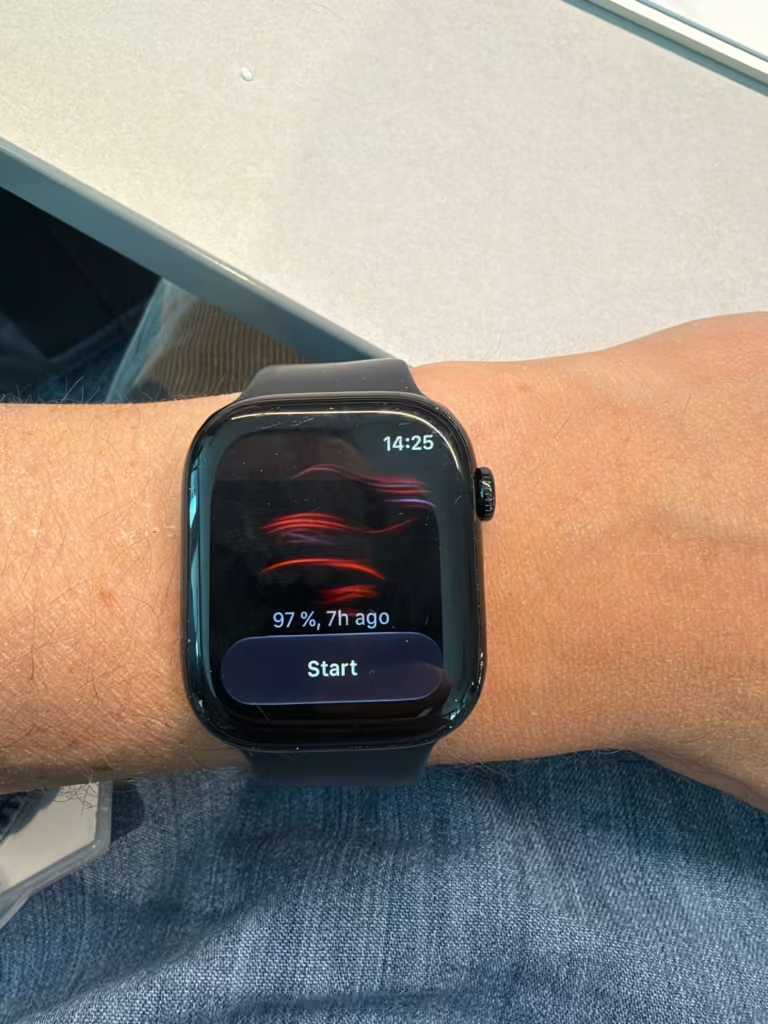
I woke up one morning and saw a notification from the night before: my blood oxygen had dipped to 97%. I stared at it for a few seconds not sure whether to keep scrolling or whether I needed to do something about it. Turns out most people don’t know what this number means either.
Quick Note: This guide is for informational and wellness purposes only. The Apple Watch is a consumer wearable, not a medical-grade device. Always speak with a doctor or medical professional if you have concerns about your health or SpO2 readings.
What SpO2 is actually measuring
SpO2 stands for peripheral oxygen saturation. It’s the percentage of your red blood cells that are carrying oxygen from your lungs to the rest of your body.
Think of your red blood cells like delivery trucks. SpO2 tells you what percentage of those trucks are loaded with oxygen. A reading of 98% means almost all of them are fully loaded. A reading of 92% means more trucks than usual are running empty.
For most people, a normal reading sits between 95% and 100%. A small number of people live their whole lives with readings below 95% and have no issues with it, so that threshold isn’t a hard alarm. What matters more than a single number is your pattern over time and how you actually feel.
How Apple Watch measures it
The back of your watch has an array of sensors that includes red and infrared LEDs. During a blood oxygen measurement, it shines bright red light through your wrist and detects how much bounces back. Oxygenated blood is bright red and absorbs less light. Blood carrying less oxygen is darker and absorbs more. The watch calculates the ratio and turns it into a percentage.
A measurement takes 15 seconds. For the most accurate result: rest your arm on a table or your lap, palm facing down and flat. Hold completely still. If your watch is loose on your wrist, the reading will fail. The back needs to stay in contact with your skin the entire time.
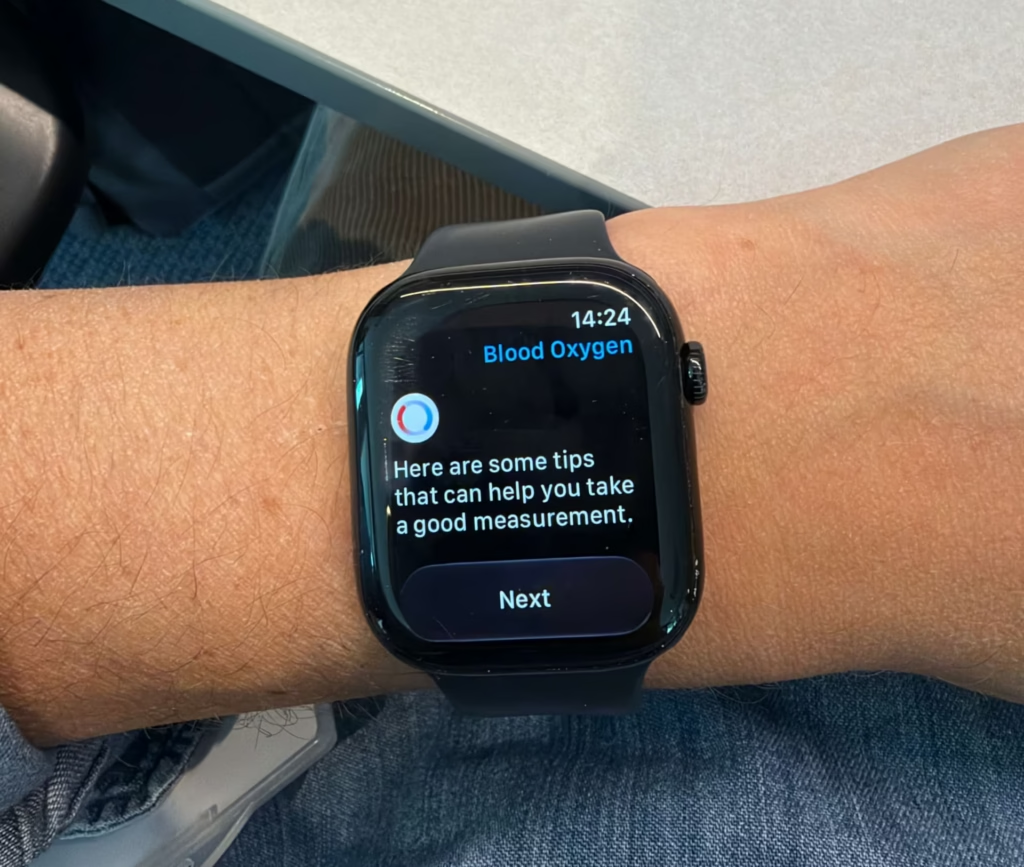
Before the measurement starts, the app prompts you to check your setup. It asks you to make sure the watch isn’t sitting too low on your wrist, that the band is firm but comfortable, and that you’re keeping the face up with your wrist resting flat. The exact prompts can vary depending on your watchOS version, but the message is the same: get settled before you tap Start.
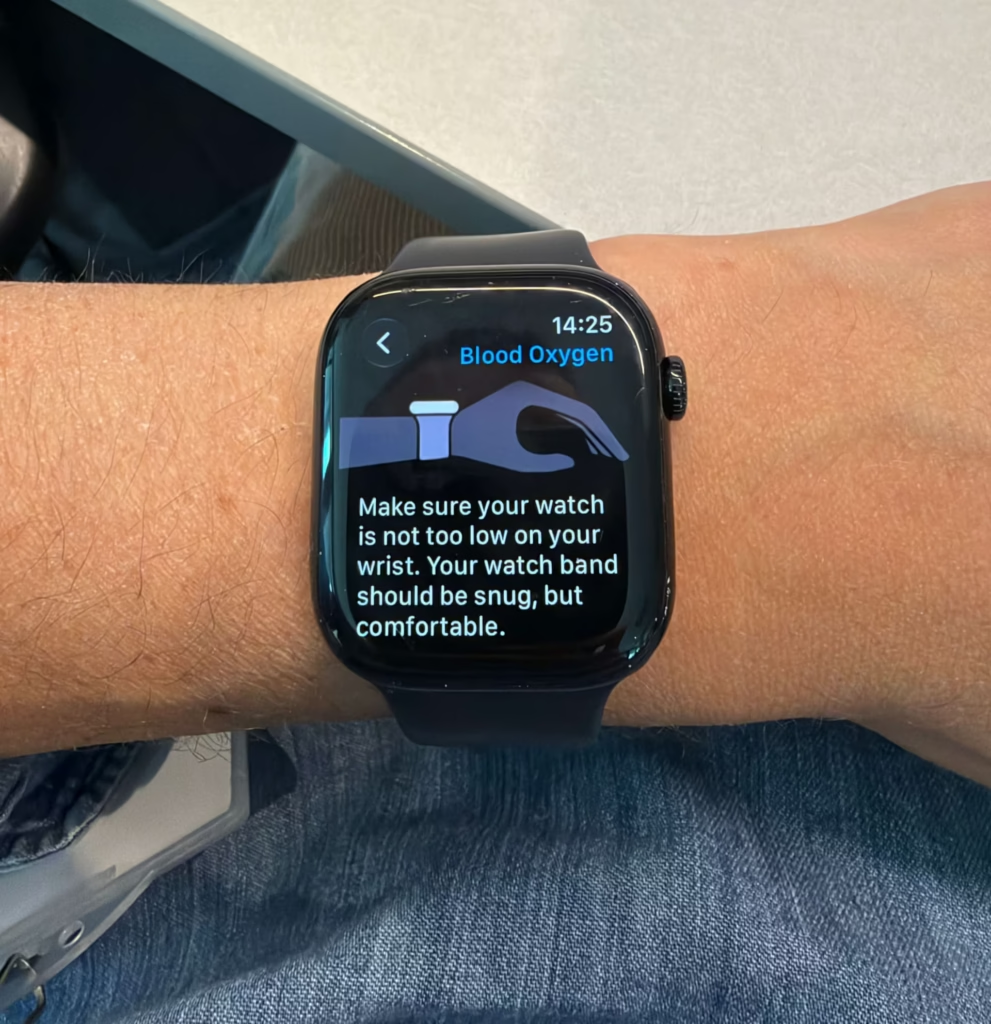
Once you tap Start, the measurement runs for 15 seconds. The watch prompts you to stay still the whole time.
Getting a clean reading — and why it’s harder than it looks
I had a few failed readings the first time I tried this. The watch would run for a few seconds and then stop with an error. Every time it came back to the same thing: I’d moved my arm.
It doesn’t take much. A small shift, a breath that moves your wrist, your hand tensing up, any of it is enough to break the reading. Now I rest my arm flat on my lap or a table before I tap Start, and I don’t move anything until it’s done.
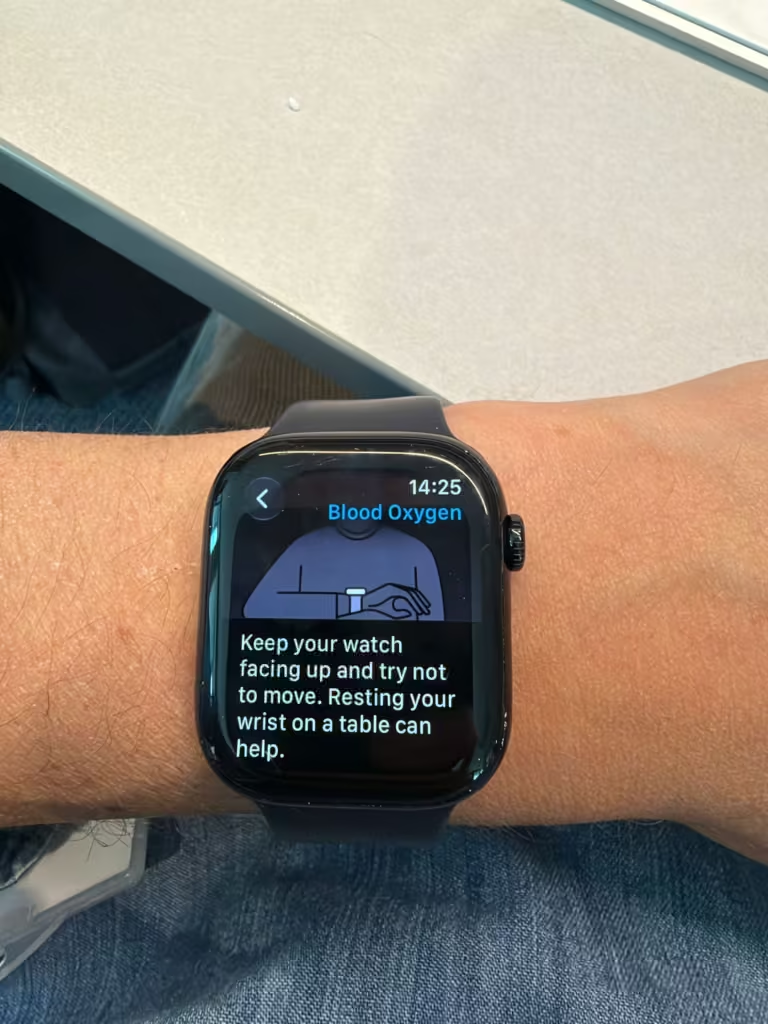
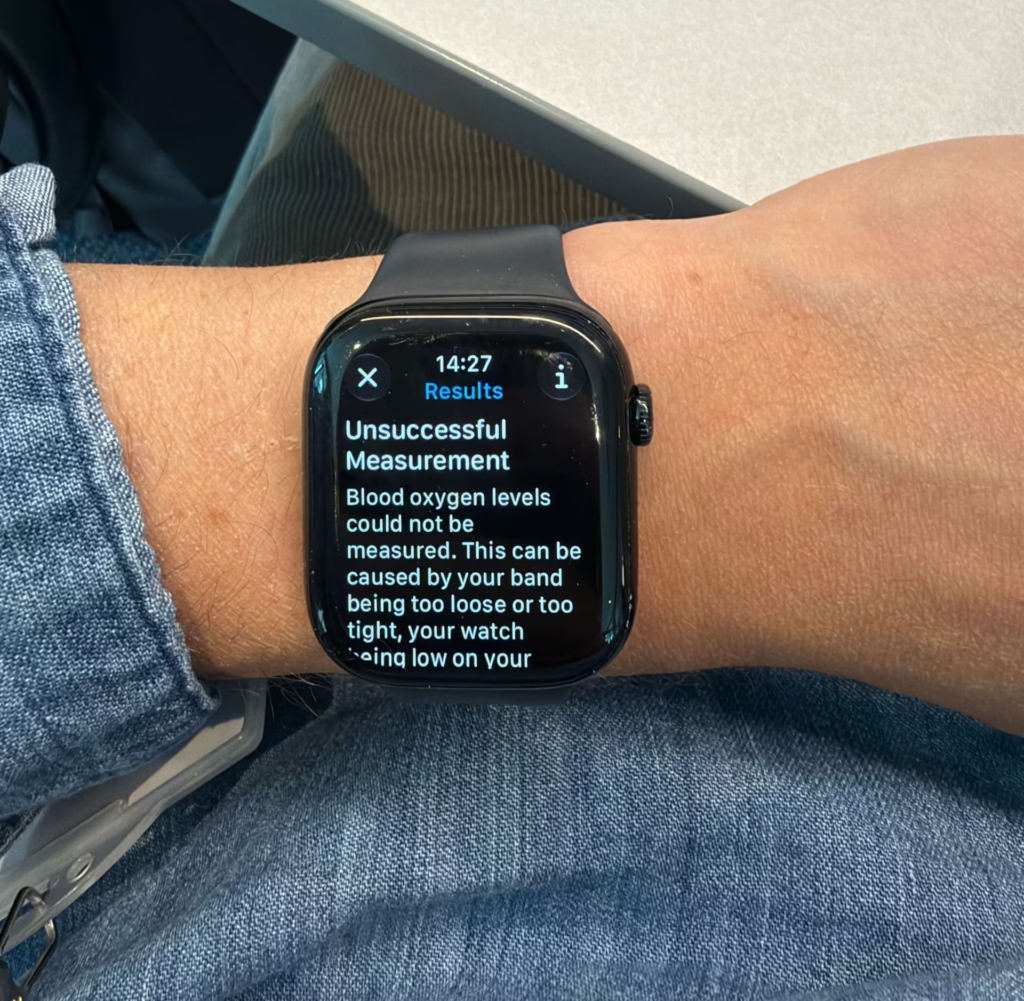
If your reading fails, don’t adjust the watch — just sit back down, get comfortable, and start again.
2 ways your watch takes readings
You can start an on-demand reading yourself whenever you want, and the watch also takes background readings automatically.
Background measurements happen when you’re not moving: mainly during sleep or when you’re sitting still. You won’t always notice them, but if it’s dark in your room, you might catch a faint red glow on your wrist. That’s normal. It’s the sensor working.
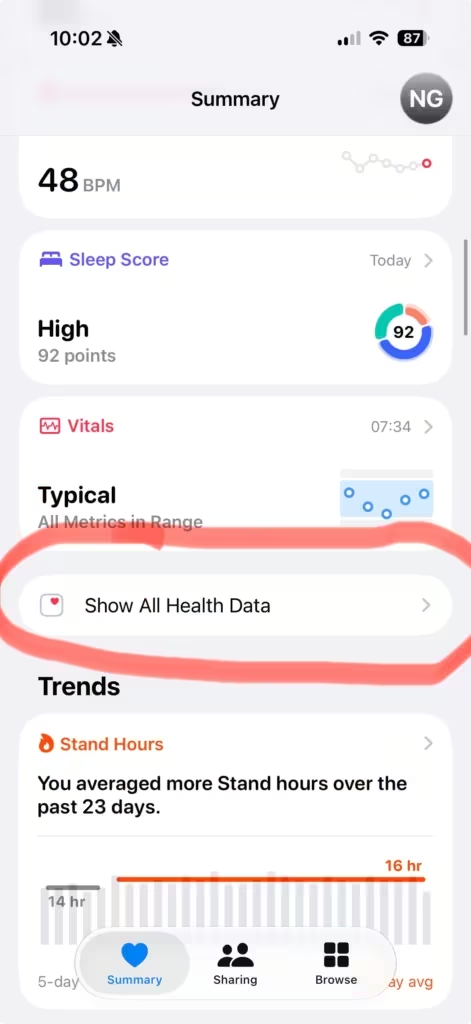
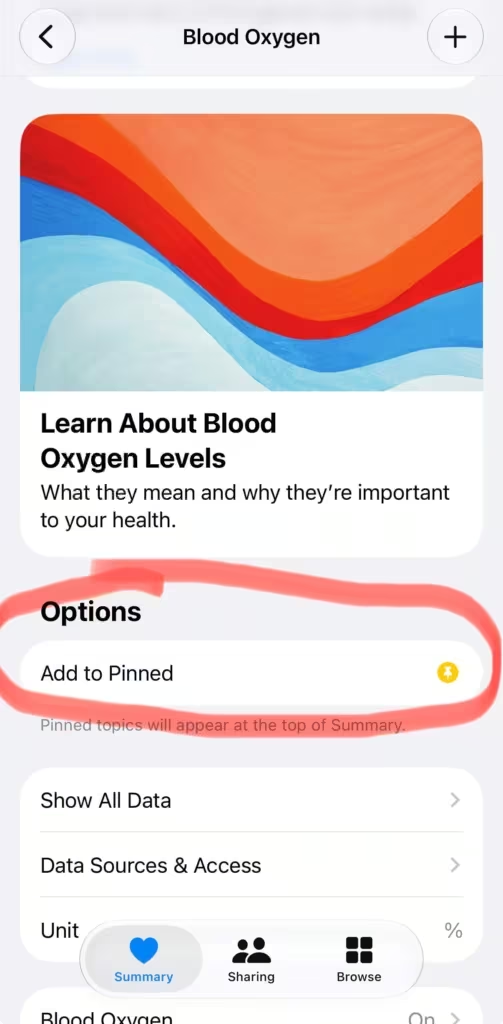
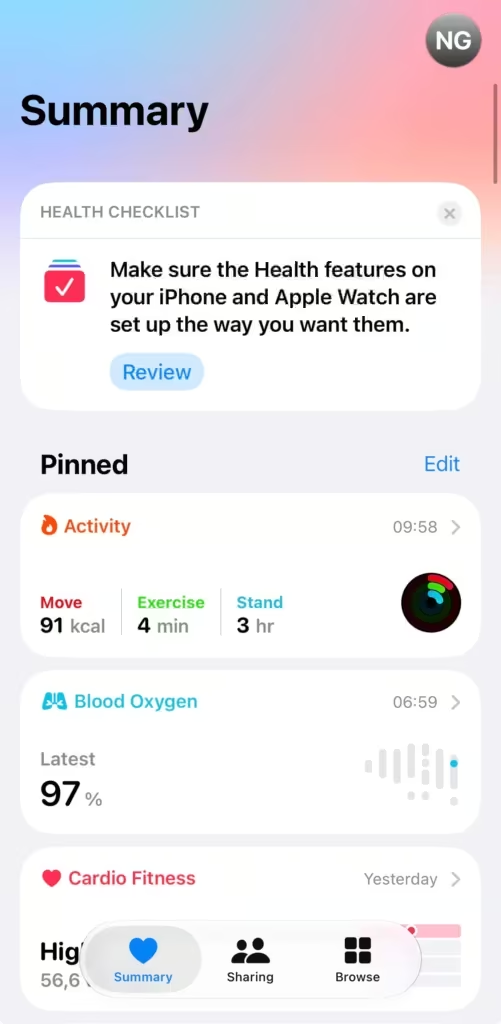
Both types of reading are saved in the Health app on your iPhone. To find them: open Health and you’ll land on the Summary screen. Scroll down to Show All Health Data, then find Blood Oxygen. If you want it front and centre every time you open the app, tap it, then tap the star icon to pin it to your Summary. From there it shows up every time you open Health without having to dig for it.
Blood Oxygen in the Vitals app vs the Health app
Blood Oxygen also shows up in the Vitals app on your watch. The difference is context. The Health app shows you the raw numbers: your full history, daily averages, sleep readings, so you can spot trends over time. The Vitals app shows you a status: Typical, High, or Low, based on how last night’s reading compares to your personal baseline. Both pull from the same data. Use the Vitals app for a quick morning check, and the Health app when you want to dig into the actual numbers.
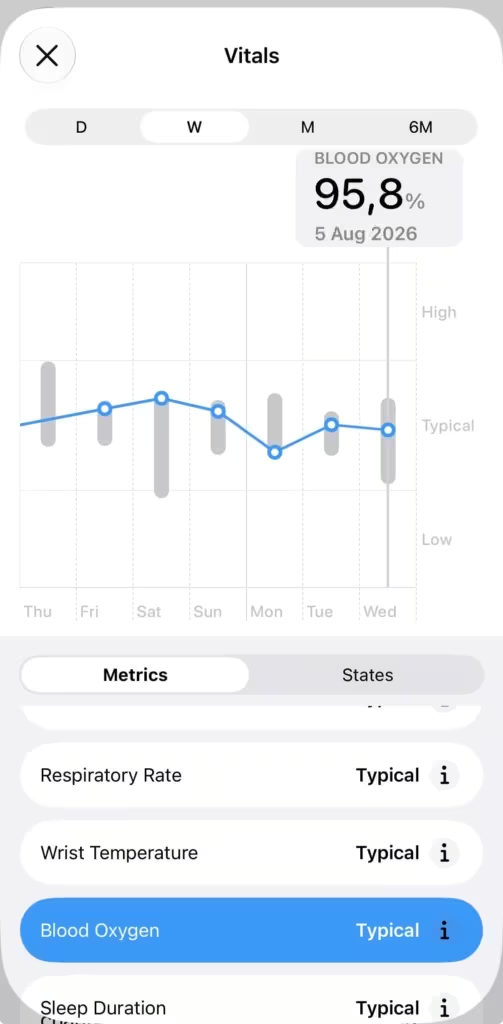
Blood oxygen readings at a glance
| Reading | What it typically means | What to consider |
|---|---|---|
| 98–100% | Fully saturated, most people’s normal | No action needed |
| 95–97% | Normal range | Fine as a consistent resting baseline |
| 93–94% | Low end of normal, or slightly below | Worth noting if it shows up repeatedly at rest |
| Below 93% | Below typical range | Discuss with a doctor if this is a regular resting reading |
| Overnight dips | Common during sleep | Expected in short bursts — sustained dips are more relevant |
Apple describes the normal range as 95–100%, with some people living normally below that. These readings are not a medical diagnosis tool.
Where Apple leaves the gap
Your watch measures SpO2 and records it. What it doesn’t do is tell you whether any given reading is normal for you specifically, or what a dip overnight actually means.
A single 94% reading could mean you rolled onto your arm in the night. Or it could be something worth looking at. The watch records the number and leaves the interpretation entirely to you.
US availability and the Masimo patent situation
The Blood Oxygen app was removed from Apple Watch units sold by Apple in the US on or after 18 January 2024 (part numbers ending in LW/A) because of a US International Trade Commission ruling in Apple’s patent dispute with Masimo.
In August 2025, Apple released a workaround: a “redesigned” Blood Oxygen feature for affected US models (Series 9, Series 10, Ultra 2) via iOS 18.6.1 and watchOS 11.6.1. With this update:
The watch still collects raw sensor data, but all measurement, calculation, and display now happen on the paired iPhone.
Results appear in the Respiratory section of the Health app, not in a standalone Blood Oxygen app on the watch.
This change only affects:
US‑purchased Series 9 / Series 10 / Ultra 2 with part numbers ending in LW/A (sold on/after 18 Jan 2024). Watches bought before that date, or outside the US, keep the original on‑watch Blood Oxygen app and are unaffected
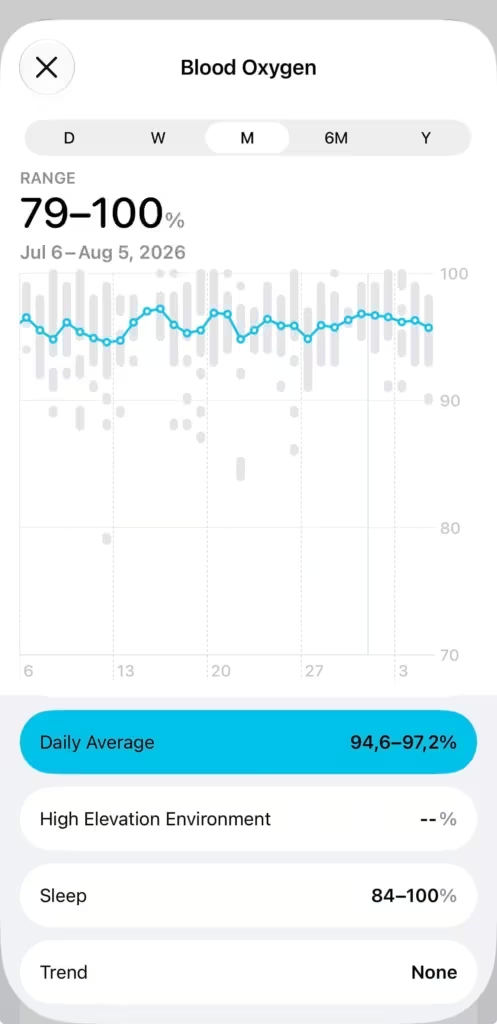
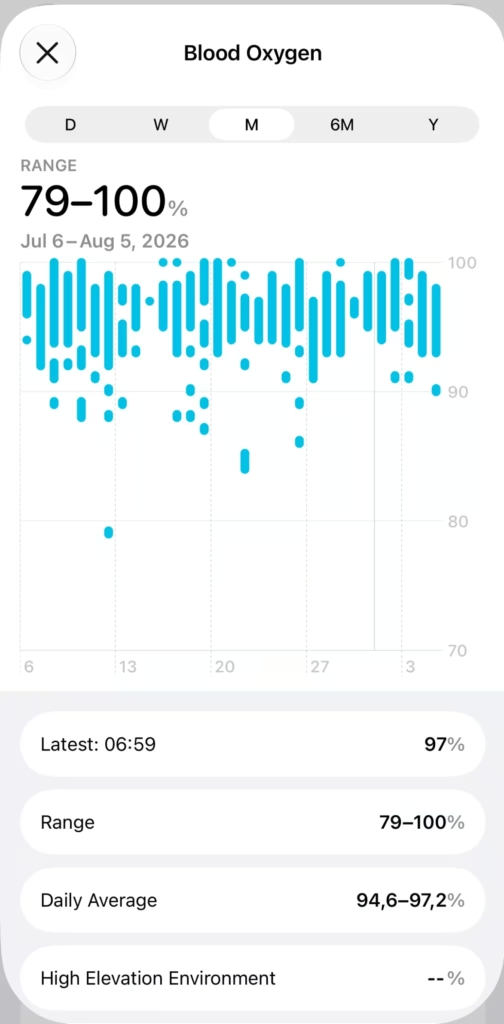
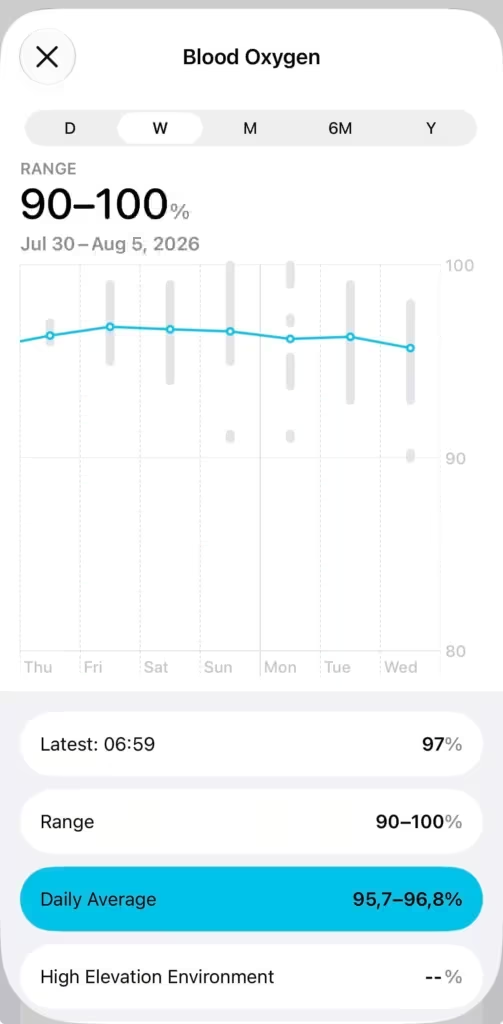
What to actually do with it
A single SpO2 reading tells you almost nothing. The value is in the trend.
Once a week, open the Health app and look at your Blood Oxygen data for the past 7 days. You’re looking at the floor of your overnight readings, not individual numbers.
If your resting daytime readings consistently stay at 95% or above, there’s nothing to act on.
If you see readings below 94% repeatedly at rest, especially on nights where you felt rough, note what was different: alcohol before bed, being sick, or a stuffy nose are all common temporary causes.
If low readings keep showing up and you can’t explain them with a clear temporary cause, that’s worth flagging to a doctor. The watch isn’t a diagnostic tool, but it can surface a pattern that deserves a proper look.
Altitude changes SpO2. If you’re hiking or travelling somewhere high, lower readings are expected. In the cold, blood flow to your skin reduces and the sensor may struggle to take readings at all. That’s not a watch problem. It’s just physics.
SpO2 also makes more sense when you read it alongside your overnight Vitals and your HRV. A night where your SpO2 dips and your HRV is low tells a clearer story than either number on its own.
(Note: Using these links supports my work at WearableWhiz at zero extra cost to you.)
The watch you need for this
Blood Oxygen requires Apple Watch Series 6 or later. It’s not available on Apple Watch SE (any generation). Ultra models support it on the hardware side, but if you’re in the US and bought an Ultra 2 in 2024 or later, the app is currently disabled due to the Masimo patent dispute.

How accurate is Apple Watch SpO2, really?
A 2025 systematic review and meta-analysis of 82 studies covering 430,052 participants found that Apple Watch SpO2 had a mean bias of just -0.04%, meaning it doesn’t consistently over or underestimate. But the limits of agreement were -4.00 to +3.94%, meaning any individual reading could be off by up to 4% in either direction.
That margin matters in practice. A reading of 97% could be anywhere from 93% to 100% in reality. The review also noted that accuracy varies by measurement conditions and individual physiology, which is consistent with what the sections below cover on band fit, movement, and cold weather.
Single readings, especially below 94%, should be read as signals worth tracking rather than conclusions.
What affects the accuracy
Beyond movement, a few other things can prevent a clean reading.
Dark or dense tattoos can block or scatter the light enough that the sensor can’t get a clean signal. When that happens you’ll often get failed readings or erratic numbers rather than a consistently ‘wrong’ percentage.
If your resting heart rate is above 150 bpm, the app won’t be able to complete a measurement. Cold weather reduces blood flow to your skin, which can make readings unreliable.
None of these are defects. They’re just the limits of what an optical wrist sensor can do.
The reading most people ignore
Most Apple Watch users set the watch up, notice the red light on their wrist occasionally, and never look at the data.
Your watch is taking SpO2 readings in the background every night. It takes about 15 seconds to open the Blood Oxygen app and take one yourself. That’s the whole effort to start building a baseline you’ll actually find useful.one yourself. That’s the whole effort to start building a baseline you’ll actually find useful.
Sources:
How to use the Blood Oxygen app on Apple Watch — Apple Support
An update on Blood Oxygen for Apple Watch in the U.S. — Apple Newsroom
https://pubmed.ncbi.nlm.nih.gov/37440093
https://pmc.ncbi.nlm.nih.gov/articles/PMC12823594/
https://www.apple.com/newsroom/2025/08/an-update-on-blood-oxygen-for-apple-watch-in-the-us